
A great portrait does more than capture a face. It reflects personality, personal style, and the mood someone wants to express. With AI image generators, creating that perfect look no longer requires a professional camera or an expensive photo shoot. The secret often lies in the prompt. An AI prompt for boys gives an image generator clear instructions about appearance, clothing, pose, lighting, and surroundings. Instead of settling for a generic portrait, you can create images that match your preferred aesthetic, whether that’s relaxed streetwear, a cinematic look, or a polished Instagram profile picture.
Tools such as ChatGPT’s image generation feature, Google Gemini, and other AI image generators offer different ways to create or edit images. Their features, availability, and results vary, but a well-written prompt provides a useful starting point.
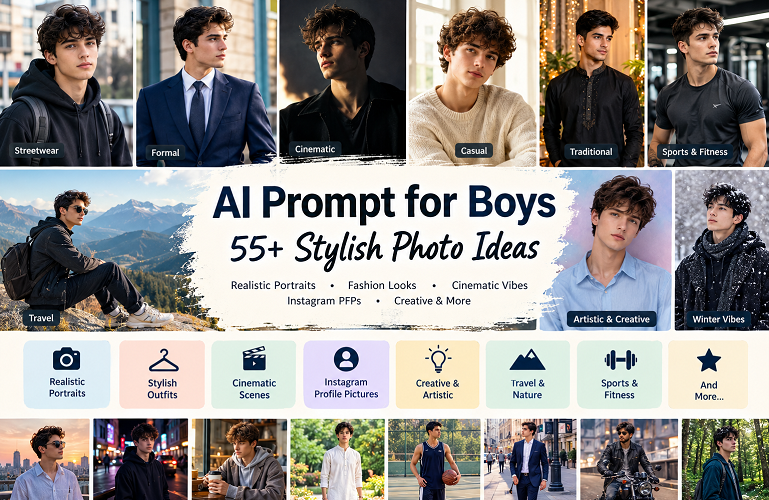
This guide brings together 55 creative AI prompt for boys, covering everything from modern hairstyles and fashionable outfits to traditional looks, sports portraits, and artistic concepts. You’ll also find practical advice for improving results, maintaining realistic details, and choosing prompts that suit your needs.
Also Read: Retro Vintage Prompt for Gemini
What Is an AI Prompt for Boys?
An AI prompt for boys is a written description that tells an image generator what kind of image to create. It can describe a person, outfit, setting, pose, lighting, and photography style.
For example, asking for a stylish portrait leaves plenty of room for interpretation. Describing a young man in a black hoodie, standing on a city street at sunset, gives the generator a much clearer direction.
Most effective prompts include several key elements:
- Subject: Describe the person, such as a teenage boy, young man, or adult male.
- Appearance: Specify the hairstyle, expression, and other visible features.
- Clothing: Choose a particular outfit, colour palette, and fashion style.
- Background: Set the scene in a studio, city, garden, beach, or other location.
- Lighting: Choose natural daylight, golden-hour sunlight, soft studio lighting, or dramatic shadows.
- Composition: Explain whether you want a close-up, headshot, half-body portrait, or full-body image.
- Visual style: Request realistic photography, cinematic colour grading, vintage film, or an illustrated aesthetic.
You don’t need to describe everything in great detail. A few well-chosen instructions can be more effective than a long prompt filled with unrelated ideas.
55 Best AI Prompts for Boys
The following prompts are ready to copy and customise. Replace the clothing, background, or other details to make each concept your own.
1. Stylish and Handsome Portrait Prompts
These prompts work well for personal portraits, social media profiles, and modern fashion photography.
Prompt 1: Classic Handsome Portrait
Create a photorealistic portrait of a stylish young man with neatly styled hair, a confident expression, and a clean casual outfit. Use soft natural lighting, realistic skin texture, sharp facial details, and a simple neutral background. Keep the composition elegant and natural.
Prompt 2: Premium Black Outfit
Create a cinematic portrait of a young man wearing a fitted black shirt, black trousers, and a minimalist wristwatch. Use dramatic side lighting, a charcoal background, and a relaxed, confident pose. Aim for the refined look of a premium fashion editorial.
Prompt 3: Soft Aesthetic Portrait
Generate a realistic portrait of a young man wearing a cream-coloured sweater beside a large window. Let soft daylight illuminate his face. Use warm neutral colours, a relaxed expression, and a softly blurred background for a calm, understated aesthetic.
Prompt 4: Modern Model Photography
Create a professional fashion portrait of a young male model wearing a contemporary tailored outfit. Use balanced studio lighting, natural skin texture, realistic proportions, and subtle shadows. The result should resemble a polished photograph from a modern fashion magazine.
Prompt 5: Confident Outdoor Portrait
Create a photorealistic outdoor portrait of a young man wearing a fitted casual jacket and stylish sneakers. Position him against an urban backdrop during golden hour. Use warm highlights, natural shadows, and an effortless pose.
2. AI Prompt for Boys With Stylish Hairstyles
Looking for hairstyle inspiration? These prompts can help you explore different looks before discussing your preferred cut with a barber.
Prompt 6: Textured Haircut
Create a realistic head-and-shoulders portrait of a young man with a modern textured haircut, natural volume, and neatly styled sides. Use soft studio lighting and a plain background. Emphasise individual hair strands and realistic facial proportions.
Prompt 7: Messy Hairstyle
Generate a casual portrait of a young man with naturally voluminous, slightly messy hair. He wears a simple white T-shirt and stands near a window. Use soft daylight, subtle shadows, and authentic lifestyle photography.
Prompt 8: Classic Side-Part Hairstyle
Create a professional portrait of a young man with a clean side-part hairstyle and a smart-casual outfit. Use a neutral studio background, balanced lighting, and realistic hair texture. Give him a relaxed expression and a timeless appearance.
Prompt 9: Modern Fade Hairstyle
Create a realistic barbershop-inspired portrait of a young man with a modern fade and a textured top. Show the haircut clearly from a slightly angled front view. Use natural lighting, accurate proportions, and a simple background.
Prompt 10: Curly Hair Portrait
Generate a high-quality portrait of a young man with natural, well-defined curls. Use soft outdoor lighting, a relaxed expression, and casual clothing. Emphasise realistic curl patterns, natural volume, and detailed photographic texture.
Practical tip: AI-generated hairstyles aren’t always accurate enough to serve as exact haircut previews. Use them as visual references rather than guarantees of how a cut will look in real life.
3. AI Prompt for Boys in Streetwear
Streetwear combines casual clothing with personal expression. These prompts suit urban portraits, fashion posts, and contemporary social media content.
Prompt 11: Oversized Hoodie
Create a photorealistic full-body portrait of a young man wearing an oversized charcoal hoodie, relaxed-fit cargo pants, and modern sneakers. Place him on a city sidewalk. Use natural overcast lighting, realistic fabric textures, and contemporary streetwear photography.
Prompt 12: Urban Street Fashion
Create an editorial photograph of a young man wearing a bomber jacket, relaxed jeans, and stylish sneakers. Position him beside a modern concrete building. Use a slightly low camera angle, cinematic colour grading, and a confident, natural pose.
Prompt 13: Denim Jacket Look
Generate a realistic portrait of a young man wearing a blue denim jacket over a plain white T-shirt. Place him on a city street with softly blurred shopfronts behind him. Use natural daylight, balanced colours, and authentic lifestyle photography.
Prompt 14: All-White Outfit
Create a full-body fashion photograph of a young man wearing a coordinated white outfit and clean white sneakers. Use minimalist architecture as the backdrop. Apply bright natural lighting, soft shadows, and realistic fabric details.
Prompt 15: Night Streetwear
Create a cinematic nighttime portrait of a young man wearing black streetwear. Add colorful city lights and subtle reflections on wet pavement. Keep the subject sharp against a softly blurred urban background, with natural skin texture and realistic clothing details.
4. Cinematic AI Prompt for Boys
Cinematic portraits use light, colour, and composition to create a distinctive atmosphere. They’re ideal for dramatic profile pictures and movie-inspired visuals.
Prompt 16: Moody Cinematic Portrait
Create a dramatic portrait of a young man standing beside a window in a dimly lit room. Use directional lighting, deep shadows, muted colours, and a thoughtful expression. Preserve natural skin texture and realistic facial details.
Prompt 17: Rainy Night Portrait
Generate a realistic portrait of a young man holding an umbrella on a rainy city street at night. Add neon lights, wet pavement, and realistic raindrops. Keep the subject in sharp focus while the background remains softly blurred.
Prompt 18: Golden-Hour Movie Scene
Create a cinematic portrait of a young man standing in an open field at sunset. Use warm golden light, a gentle breeze moving his hair, and a distant landscape. Give him a reflective expression and natural photographic detail.
Prompt 19: Dark Academia Style
Create a moody editorial portrait of a young man wearing a dark blazer over a knit sweater. Place him in an old library with wooden shelves and warm ambient lighting. Emphasise rich textures, subtle shadows, and a thoughtful atmosphere.
Prompt 20: Futuristic City Portrait
Generate a cinematic portrait of a young man in a futuristic city at night. Include modern architecture, glowing signs, reflective surfaces, and atmospheric lighting. Maintain realistic proportions and detailed clothing while giving the scene a science-fiction aesthetic.
5. AI Prompt for Boys for Instagram and Social Media
A strong profile picture should be easy to recognise, even at a small size. Simple compositions usually work better than crowded backgrounds.
Prompt 21: Instagram Profile Picture
Create a clean, photorealistic head-and-shoulders portrait of a young man wearing a dark crew-neck shirt. Use soft directional lighting, a simple blurred background, realistic skin texture, and a natural expression. Centre the face and leave enough space around the head for cropping.
Prompt 22: Minimalist Profile Photo
Generate a minimalist portrait of a young man against a warm beige background. Give him a plain T-shirt and a relaxed expression. Use soft studio lighting and natural facial details. Keep the composition uncluttered and suitable for a circular profile-picture crop.
Prompt 23: Luxury Social Media Portrait
Create an editorial portrait of a young man wearing a tailored dark jacket and a subtle wristwatch. Use elegant architectural surroundings, soft directional lighting, and understated colors. Aim for a refined, realistic appearance without excessive retouching.
Prompt 24: Casual Mirror Selfie
Create a realistic mirror selfie of a young man wearing an oversized T-shirt and relaxed trousers in a tidy, modern bedroom. Use natural window light, accurate mirror reflections, realistic phone proportions, and an everyday pose.
Prompt 25: Travel-Inspired Portrait
Generate a realistic travel portrait of a young man standing at a scenic overlook with mountains in the distance. Give him a casual jacket and a relaxed expression. Use natural daylight and balanced framing so the landscape complements the subject.
6. AI Prompt for Boys Wearing Traditional Outfits
Traditional clothing offers plenty of possibilities for cultural celebrations, family occasions, and personal portraits. These prompts are particularly useful for South Asian fashion styles.
Prompt 26: Black Panjabi Portrait
Create a photorealistic portrait of a young South Asian man wearing an elegant black panjabi. Place him in a refined setting with warm ambient lighting. Emphasize realistic fabric folds, natural skin texture, and a confident, relaxed expression.
Prompt 27: White Panjabi at Eid
Generate a bright, realistic portrait of a young South Asian man wearing a crisp white panjabi. Add tasteful festive decorations and soft natural lighting. Keep the composition elegant, with realistic fabric details and a warm celebratory atmosphere.
Prompt 28: Traditional Festive Look
Create an editorial portrait of a young man wearing a richly textured traditional outfit in deep navy blue. Use subtle decorative elements, warm lighting, and a clean background. Highlight realistic embroidery and natural facial features.
Prompt 29: Traditional Outfit Outdoors
Generate a full-body photograph of a young South Asian man wearing a traditional panjabi and pajama. Place him in a landscaped garden during the morning. Use soft sunlight, natural colors, and an understated pose.
Prompt 30: Modern Traditional Fashion
Create a contemporary fashion portrait of a young man wearing a modern-cut panjabi, tailored trousers, and simple footwear. Use minimalist architecture and balanced daylight. Keep the styling fresh while respecting the garment’s traditional design.
7. AI Prompts fo Boys With Sports and Fitness Themes
Sports portraits can capture energy, athletic style, and a passion for physical activity. The following prompts focus on realistic proportions and believable settings.
Prompt 31: Athletic Portrait
Create a realistic athletic portrait of a fit young adult man wearing a simple sports T-shirt. Use a clean gym background, balanced lighting, and natural muscle definition. Maintain realistic body proportions and avoid artificial skin smoothing.
Prompt 32: Football Player Portrait
Generate a dynamic portrait of a young male football player wearing a generic football kit. Place him on a green field beneath stadium lights. Use realistic fabric textures, natural athletic proportions, and dramatic sports photography.
Prompt 33: Basketball Court Portrait
Create a realistic full-body photograph of a young man holding a basketball on an outdoor court. Use late-afternoon sunlight, athletic casual clothing, and a natural pose. Include authentic court details and realistic shadows.
Prompt 34: Gym Lifestyle Photo
Generate a photorealistic lifestyle image of an adult man in a modern gym wearing appropriate workout clothes. Use natural-looking overhead lighting, realistic exercise equipment, and a focused expression. Keep the proportions and setting believable.
Prompt 35: Running Portrait
Create a dynamic sports photograph of a young man jogging along a park trail in athletic clothing. Use early-morning light, natural movement, and a softly blurred green background. Capture realistic fabric motion and an energetic atmosphere.
8. Creative and Artistic AI Prompt for Boys
Not every portrait needs to look like a conventional photograph. Artistic prompts let you experiment with color, atmosphere, and imaginative settings.
Prompt 36: Vintage Film Portrait
Create a realistic vintage-style portrait of a young man wearing a simple casual outfit. Use subtle film grain, warm tones, gentle contrast, and natural window light. Make the image resemble a photograph taken with a classic film camera.
Prompt 37: Black-and-White Photography
Generate a striking black-and-white portrait of a young man with a thoughtful expression. Use directional studio lighting, detailed shadows, and a plain background. Emphasize facial structure, realistic skin texture, and classic photographic contrast.
Prompt 38: Anime-Inspired Character
Create an original anime-inspired illustration of a stylish young male character wearing a modern hoodie. Use expressive eyes, carefully designed hair, clean linework, and a colorful urban background. Keep the character design consistent and visually balanced.
Prompt 39: Fantasy Portrait
Generate a fantasy-inspired portrait of a young man wearing a dark cloak in an ancient stone setting. Add atmospheric mist, soft rim lighting, and detailed fabric textures. Maintain realistic proportions and cinematic composition.
Prompt 40: Dreamy Pastel Portrait
Create a soft artistic portrait of a young man wearing a light blue shirt against a pastel background. Use diffused lighting, delicate colors, and a peaceful expression. Preserve recognizable facial features while adding a gentle editorial aesthetic.
9. More AI Prompt for Boys to Try
These additional prompts cover travel, formal wear, everyday lifestyle photography, and other popular portrait ideas.
Prompt 41: Rooftop Portrait
Create a realistic portrait of a young man standing on a rooftop at sunset, wearing a casual jacket. Show a modern skyline behind him, with warm sunlight and natural shadows.
Prompt 42: Coffee Shop Aesthetic
Generate a candid photograph of a young man sitting beside a coffee shop window. Give him a neutral sweater, a coffee cup, and a relaxed expression. Use soft daylight and natural lifestyle photography.
Prompt 43: Winter Fashion
Create a realistic winter portrait of a young man wearing a wool coat, scarf, and knit sweater. Add a softly falling snow background, cool natural light, and detailed fabric textures.
Prompt 44: Beach Portrait
Generate a natural portrait of a young man standing on a quiet beach at sunset. Use a casual linen shirt, gentle ocean waves, and warm golden light.
Prompt 45: Motorcycle Lifestyle
Create an editorial photograph of an adult man standing beside a parked motorcycle. Give him a casual riding jacket and place him against an urban backdrop. Use dramatic but realistic lighting and balanced composition.
Prompt 46: Formal Suit Portrait
Create a professional portrait of a young man wearing a well-fitted navy suit and white shirt. Use a clean studio background, soft lighting, and natural facial details.
Prompt 47: Rainy Window Portrait
Generate a thoughtful portrait of a young man sitting beside a rain-covered window. Use soft natural light, muted colors, and realistic reflections to create a calm, cinematic mood.
Prompt 48: Nature Photography
Create a realistic outdoor portrait of a young man standing among tall green trees. Use dappled sunlight, natural colors, and a shallow depth of field.
Prompt 49: Minimalist Editorial
Generate a modern editorial portrait of a young man wearing a neutral outfit against a clean architectural background. Use simple geometry, soft shadows, and balanced composition.
Prompt 50: Confident Walking Shot
Create a realistic full-body photograph of a young man walking naturally along a city sidewalk. Give him a stylish casual outfit and place him against an urban background with realistic perspective.
Prompt 51: Best-Friend Portrait
Create a candid photograph of two young adult male friends laughing together in a park. Use casual clothing, natural expressions, soft afternoon light, and realistic body language.
Prompt 52: Artistic Double Exposure
Create an artistic double-exposure portrait of a young man, blending his side profile with a mountain landscape. Use subtle transitions, balanced contrast, and carefully preserved facial details.
Prompt 53: Studio Fashion Portrait
Generate a high-quality studio portrait of a young man wearing a contemporary neutral-toned outfit. Use softbox-style lighting, a seamless background, and realistic clothing textures.
Prompt 54: College Casual Style
Create a natural lifestyle portrait of a college-age young man wearing a casual shirt, jeans, and sneakers. Place him on a university campus with softly blurred buildings in the background.
Prompt 55: Sunrise Portrait
Generate a cinematic portrait of a young man standing outdoors at sunrise. Use gentle backlighting, soft atmospheric haze, natural colors, and a peaceful expression.
How to Write a Better AI Prompt for Boys
The prompts above provide a starting point, but a few adjustments can make the results feel more personal. Focus on the details that matter most to your image.
Describe the Subject Clearly
Begin by identifying the subject and the overall look you want.
For example, “a young man wearing a navy hoodie” gives the image generator a more specific direction than “a handsome boy.”
If you’re creating an image of yourself, use a clear reference photo when the platform supports it. Explain which features or details you want to preserve.
Choose Specific Clothing
Clothing has a strong influence on the finished image. Instead of asking for a cool outfit, describe the garments, colors, and fit.
Consider these combinations:
- Oversized black hoodie with relaxed cargo pants
- White linen shirt with beige trousers
- Navy blazer with a plain white T-shirt
- Traditional panjabi with tailored trousers
- Athletic T-shirt with running shorts
Choose pieces that complement each other. Too many competing styles can make the result look inconsistent.
Explain the Lighting
Lighting affects the image’s mood, contrast, and overall appearance.
Golden-hour sunlight creates warm outdoor portraits. Soft window light gives images a natural feel, while dramatic side lighting adds depth. Even studio lighting works well for professional headshots.
Choose lighting that supports the style rather than adding it as an afterthought.
Pick a Suitable Background
The setting should reinforce the image’s main idea.
A neutral studio backdrop suits profile pictures. City streets complement streetwear, while gardens and mountain landscapes work well for outdoor portraits.
If the face is the main focus, request a softly blurred background. This helps separate the subject from surrounding details.
Specify the Camera Composition
Clear framing instructions help the generator understand what should appear in the final image.
- Close-up: Emphasizes facial features and expression.
- Head-and-shoulders portrait: Works well for profile pictures.
- Half-body portrait: Shows the upper body and clothing.
- Full-body photograph: Displays the complete outfit.
- Wide composition: Includes more of the environment.
For many social media posts, a vertical 4:5 composition is a useful starting point. Square images can work well for profile pictures, but check the platform’s cropping requirements before publishing.
AI Prompt Comparison Table: AI Prompts for Boys
Not sure which style to try first? Use this comparison to match your prompt to the result you want.
| Photo style | Best use | Details to include |
|---|---|---|
| Realistic portrait | Profile pictures | Natural skin texture, soft lighting |
| Streetwear | Fashion posts | Urban background, layered clothing |
| Cinematic | Dramatic portraits | Directional lighting, deep shadows |
| Traditional | Cultural celebrations | Accurate clothing, warm lighting |
| Sports | Athletic profiles | Natural proportions, action composition |
| Vintage | Creative portraits | Film grain, muted colors |
| Minimalist | Professional photos | Plain background, simple styling |
| Fantasy | Artistic projects | Atmospheric setting, imaginative details |
Pros and Cons of Using AI Prompts for Boys
AI-generated portraits make it easy to experiment with different visual styles. Still, it’s worth understanding what these tools do well and where they fall short.
Pros
- Wide creative range: Explore casual, formal, cinematic, and artistic styles.
- Control over visual details: Adjust clothing, lighting, backgrounds, and composition.
- Fast experimentation: Compare concepts without arranging a physical photo shoot.
- Personalized results: Match images to your preferred colors and aesthetic.
- Visual inspiration: Explore hairstyles, outfit combinations, and photography ideas.
Cons
- Inconsistent facial identity: Some generators change facial features between images.
- Anatomical errors: Hands, fingers, reflections, and body proportions may look unnatural.
- Clothing inconsistencies: Patterns, logos, and fabric folds can appear distorted.
- Overprocessed appearance: Some images have unnaturally smooth skin or exaggerated details.
- Privacy concerns: Uploading personal photographs can involve data-handling risks.
Before sharing an image, inspect the face, hands, hairline, clothing, and background. A visually appealing image can still contain noticeable mistakes.
Expert Tips for Better AI-Generated Photos: AI Prompts for Boys
A good prompt helps, but the way you refine it can make an equally noticeable difference.
Start With One Clear Idea
Avoid mixing too many unrelated styles into one request. Streetwear, formal suits, fantasy armor, and traditional clothing may compete for attention if you combine them without a clear direction.
Choose one main aesthetic and build around it.
Use Reference Photos Carefully
If you want an image to resemble you, upload a clear reference photo when the tool supports image input. Request changes to the outfit, background, or lighting while asking the generator to preserve your recognizable facial features.
The result may still differ from your original appearance. Check the platform’s privacy settings and image-upload policies before submitting personal photographs.
Refine One or Two Details at a Time
Changing every part of a prompt makes it harder to identify what improved the image.
Try this simple process:
- Generate a portrait featuring a black hoodie.
- Change the background to a city street.
- Add soft evening lighting.
- Request a more natural expression.
- Adjust the framing for a profile picture.
This approach helps you compare results and refine the details that matter.
Be Specific Instead of Overloading the Prompt
Words such as “perfect,” “ultra-beautiful,” and “extremely detailed” don’t guarantee a better image.
Concrete instructions are more useful. Describe the lighting direction, fabric, pose, background, and framing instead of relying on vague praise.
Protect Your Privacy
Think carefully before uploading identifiable photographs. Avoid submitting sensitive documents, private images, or pictures of other people without their permission.
When creating images of friends or family members, respect their privacy. Never use AI edits to misrepresent someone or create inappropriate images, especially involving minors.
(FAQs): About AI Prompts for Boys
1. What is the best AI prompt for boys?
The best prompt depends on the image you want. For a realistic profile picture, describe the subject, outfit, lighting, background, and framing. A focused prompt with clear instructions often produces more useful results than a long list of vague adjectives.
2. Which AI tool can generate photos of boys?
ChatGPT, Google Gemini, and other image-generation platforms may support portrait creation. Their features, image-upload options, access limits, and editing controls vary by tool and account.
3. How can I create a realistic AI photo of myself?
Start with a clear reference photo if your chosen tool supports it. Describe your preferred outfit, background, lighting, and pose. Ask the generator to preserve your recognizable facial features, then check the result for unwanted changes.
4. Which AI prompt works best for an Instagram profile picture?
A head-and-shoulders portrait with a simple background is a reliable starting point. Request natural skin texture, soft lighting, a clear view of the face, and enough space around the head for cropping.
5. Can I use AI prompts to try different hairstyles?
Yes. Describe the haircut, hair texture, length, and styling. A reference image may help when supported. However, AI-generated results aren’t guaranteed to represent how a real haircut will look.
6. How do I make an AI-generated photo look more realistic?
Use natural lighting, realistic skin texture, accurate proportions, and simple backgrounds. Avoid excessive retouching, and inspect the eyes, fingers, hairline, clothing details, and reflections before accepting the result.
7. Can I use these prompts in Google Gemini?
You can try these prompts with Gemini’s image-generation features when available. You may need to adjust certain instructions to suit the model and the image-editing options available to your account.
8. Are AI-generated photos free to create?
Not every platform offers unlimited free image generation. Some provide limited free access, while others require subscriptions, credits, or paid usage. Check the current pricing and terms of your chosen service.
9. Can I post AI-generated photos on Instagram?
You can generally share AI-generated images if you follow the platform’s current rules and respect other people’s rights. Commercial use may also depend on the image generator’s terms. Avoid presenting misleading edits as authentic photographs when the distinction matters.
10. How can I keep my face consistent across multiple AI images?
Use the same reference photo when supported, and keep your descriptions of facial features consistent. Change the outfit, background, or lighting while leaving other details unchanged. Even then, some tools may produce noticeable differences between images.
Conclusion: AI Prompts for Boys
The right AI prompt for boys can turn a simple idea into a distinctive portrait. Whether you’re looking for streetwear inspiration, a traditional outfit, a cinematic scene, or a clean Instagram profile picture, specific instructions give you more control over the creative process.
Start with one of the 55 prompts in this guide. Adjust the clothing, lighting, background, and composition to suit your taste. Then make small changes until the image feels right.
You don’t need the longest prompt to get a strong result. You need a clear vision, useful details, and a willingness to experiment.
Try different styles, review each image carefully, and choose the results that best express your personal aesthetic.