
A striking photograph can make a social media post stand out. Yet getting the right look often takes more time, planning, and editing than expected. Google’s Gemini offers another option: describe the image you want and use AI tools to bring the idea to life. That’s what makes the Gemini AI photo prompt trending topic worth exploring. Instead of relying on vague instructions, you can use carefully written prompts to guide your results and refine them as needed.
With the right prompt, you can experiment with cinematic portraits, luxury fashion, vintage photography, and professional headshots. You can also explore creative locations without arranging an actual photoshoot.
The difference often comes down to the details. A useful prompt explains what the subject should wear, where the scene takes place, how the light should fall, and what mood the image should convey.
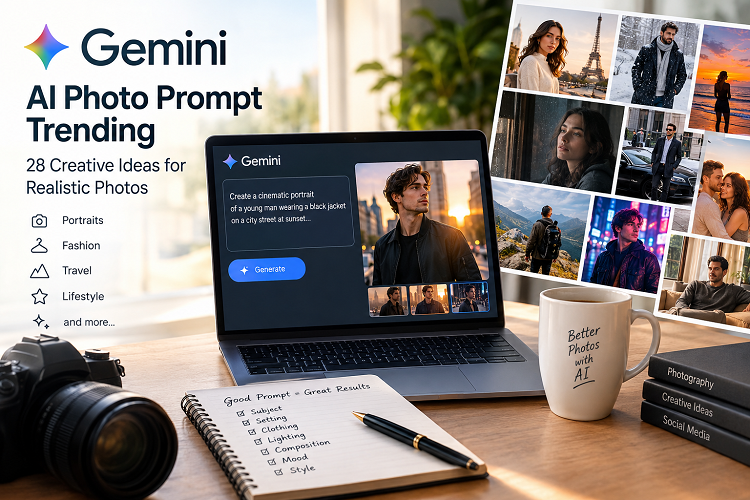
This guide includes 28 copy-and-paste prompts, practical advice for improving image quality, and answers to common questions. Whether you’re creating content for Instagram, building a website, or updating a profile picture, you’ll find ideas you can adapt to your own style.
Also Read: Gemini AI Saree Look Couple Prompt
What Is a Gemini AI Photo Prompt Trending?
A Gemini AI photo prompt is a written instruction that describes the image you want to create or edit using Google’s AI tools.
Depending on the features available in your account, Gemini may let you generate images from text, upload a reference photo, or make changes to an existing image.
A simple prompt might say, “Create a cinematic portrait in warm evening light.” That gives the AI a starting point, but it leaves several creative decisions open.
A more specific version provides clearer direction:
Create a photorealistic portrait of a young adult man wearing a black jacket on a city street at sunset. Use warm backlighting, natural skin texture, realistic facial proportions, and a softly blurred background. Keep the expression relaxed and the composition suitable for a social media profile.
The second prompt describes the subject, clothing, setting, lighting, and composition. These details give the model a more useful picture of the intended result.
Trending prompts often draw inspiration from popular visual styles, including luxury fashion, moody city scenes, retro film photography, and natural outdoor portraits. However, a popular-looking style isn’t necessarily a current viral trend. Actual popularity depends on what people are sharing and engaging with at a given time.
Why Are Trending Gemini AI Photo Prompt Trending Popular?
Several practical benefits explain the interest in AI-generated photography.
Creative Freedom Without a Full Photoshoot
You can experiment with different locations, outfits, and lighting conditions without booking a photographer or travelling to a particular destination.
For instance, one prompt can place a subject in a modern studio. Another can create a sunset portrait on a beach. A third can explore a vintage street-photography aesthetic.
These images won’t replace every real photoshoot, but they can help you test ideas quickly.
More Control Over the Final Look
A detailed prompt gives you a way to communicate your preferences. You can specify the background, clothing, camera angle, lighting, colour palette, and overall mood.
You can also refine the result through follow-up instructions rather than starting over each time.
Useful for Social Media and Websites
Content creators often need fresh visuals for Instagram, Facebook, Pinterest, YouTube thumbnails, and websites.
AI-generated images can help develop a consistent visual identity or illustrate a concept that would otherwise be difficult to photograph. Before publishing, check the relevant platform’s policies and make sure the image suits its intended purpose.
Accessible to Beginners
You don’t need professional photography equipment or advanced editing skills to start experimenting. Plain English is enough to describe a basic scene.
As you gain experience, you can add more precise instructions and learn which details have the greatest effect on your results.
28 Trending Gemini AI Photo Prompt Trending to Try
The following examples cover a range of popular photographic aesthetics. Each prompt is an original starting point, not a guarantee of viral engagement or identical results across generations.
Copy the prompt that matches your goal, then adjust the subject, clothing, setting, and mood to suit your project.
1. Cinematic Portrait
Best for: Dramatic profile pictures and editorial-style social posts.
Prompt:
Create a photorealistic cinematic portrait of a young adult man wearing a fitted black jacket. Use dramatic side lighting, a dark, softly blurred background, realistic skin texture, and natural facial proportions. Frame the subject from the chest up with a confident expression. Use professional editorial photography, balanced contrast, and detailed facial features. Avoid excessive skin smoothing and exaggerated proportions.
2. Luxury Lifestyle Photography
Best for: Fashion content, personal branding, and sophisticated lifestyle images.
Prompt:
Create a realistic luxury lifestyle photograph of a young adult man wearing a tailored black outfit in an elegant modern hotel lobby. Include warm ambient lighting, marble surfaces, and tasteful architectural details. Use a relaxed, confident pose, natural skin texture, realistic fabric folds, and refined color grading. Keep the scene sophisticated rather than excessively flashy.
3. Golden-Hour Portrait
Best for: Warm, natural-looking profile photos.
Prompt:
Create a photorealistic outdoor portrait of a young adult man during golden hour. Let soft sunlight illuminate one side of his face and create a gentle rim light around his hair. Use a naturally blurred background, warm colors, realistic skin texture, and a relaxed expression. Maintain natural proportions and believable shadows. Make the image resemble a professional portrait taken with a portrait lens.
4. Rainy City Street
Best for: Moody photography and cinematic social media posts.
Prompt:
Create a cinematic street photograph of a young adult man wearing a dark coat on a rainy city street at night. Include reflections on wet pavement, subtle neon lights, soft background bokeh, and realistic raindrops. Use dramatic but believable lighting, detailed clothing textures, and natural facial proportions. The image should resemble a still from a modern film rather than a fantasy illustration.
5. Professional Headshot
Best for: LinkedIn, business websites, and professional profiles.
Prompt:
Create a professional studio headshot of an adult wearing a navy business suit and a clean white shirt. Use a neutral light-gray background, soft and balanced lighting, realistic skin texture, and a confident, approachable expression. Frame the subject from the shoulders up. Preserve natural facial proportions and avoid excessive retouching. The result should look appropriate for a corporate website or professional networking profile.
6. Instagram Mirror Selfie
Best for: Casual social media content and everyday fashion posts.
Prompt:
Create a realistic mirror selfie of a young adult wearing a relaxed streetwear outfit in a clean, modern bedroom. Include soft natural window light, believable reflections, realistic clothing folds, and a contemporary smartphone. Keep the pose casual and the background uncluttered. Preserve natural body proportions and realistic hands. Aim for polished but authentic social media photography.
7. Black-and-White Portrait
Best for: Minimalist profile pictures and artistic photography.
Prompt:
Create a timeless black-and-white portrait of an adult with a thoughtful expression. Use directional studio lighting, rich tonal contrast, detailed skin texture, and a simple dark background. Preserve natural facial proportions and subtle expression lines. Give the photograph an intimate editorial feel with deep blacks, controlled highlights, and no artificial beauty filters.
8. Streetwear Fashion
Best for: Urban fashion inspiration and contemporary style content.
Prompt:
Create a full-body editorial fashion photograph of a young adult wearing an oversized hoodie, relaxed-fit cargo pants, and clean sneakers. Place the subject against an urban concrete wall with subtle architectural details. Use natural daylight, realistic fabric textures, accurate body proportions, and a confident streetwear pose. Keep the color palette modern and understated.
9. Classic Film Photography
Best for: Retro-inspired posts and nostalgic visual concepts.
Prompt:
Create a realistic 1990s-inspired film photograph of an adult standing beside an old brick building. Use slightly faded colors, subtle film grain, soft natural light, and candid composition. Preserve natural facial details and realistic clothing textures. Avoid excessive grain, artificial scratches, and exaggerated vintage effects.
10. Rainy Window Portrait
Best for: Reflective, emotional, and atmospheric photography.
Prompt:
Create a close-up portrait of an adult sitting beside a rain-covered window on a cloudy afternoon. Soft window light should illuminate the face while keeping the background gently blurred. Include realistic water droplets on the glass, natural skin texture, and a thoughtful expression. Use muted colors and an intimate photographic style.
11. Sunset Beach Portrait
Best for: Summer content, travel memories, and relaxed lifestyle photography.
Prompt:
Create a photorealistic beach portrait of an adult standing near the shoreline at sunset. Include gentle waves, warm orange light, realistic reflections on the water, and a natural breeze moving the subject’s clothing. Use subtle cinematic color grading and believable shadows. Keep the atmosphere peaceful and the subject’s proportions realistic.
12. Paris Travel Photography
Best for: Travel blogs, destination guides, and European-inspired visuals.
Prompt:
Create a realistic travel photograph of an adult walking along a charming Parisian street near sunset. Include classic architecture, outdoor café seating, warm window lights, and a softly blurred Eiffel Tower in the distant background. Use natural perspective, authentic street details, and professional travel photography. Avoid distorted buildings, duplicated people, and unreadable artificial signage.
13. Neon Night Portrait
Best for: Modern urban aesthetics and dramatic profile photos.
Prompt:
Create a photorealistic portrait of an adult standing beneath a city awning at night. Use blue and magenta neon reflections, a wet street, soft cinematic shadows, and a dark modern jacket. Keep the face naturally illuminated and the background softly blurred. The result should resemble professional urban photography rather than a science-fiction illustration.
14. Minimalist Studio Portrait
Best for: Clean profile pictures, portfolios, and modern personal branding.
Prompt:
Create a minimalist studio portrait of an adult against a warm beige background. Use soft diffused lighting, neutral clothing, realistic skin texture, and a relaxed expression. Keep the composition simple, with generous negative space. Maintain natural facial proportions and avoid strong filters, excessive contrast, or distracting background elements.
15. Luxury Car Photography
Best for: Automotive content and upscale lifestyle visuals.
Prompt:
Create a realistic editorial photograph of an adult standing beside an elegant black luxury sedan outside a modern building. Use overcast daylight, realistic reflections on the car’s paint, accurate vehicle proportions, and sophisticated color grading. Keep the pose natural and the background understated. Avoid distorted wheels, inconsistent reflections, and imaginary brand logos.
16. Rainy-Day Coffee Shop
Best for: Cosy lifestyle content and relaxed social media posts.
Prompt:
Create a natural-looking photograph of an adult sitting beside a café window with a cup of coffee. Rain droplets cover the glass, while soft daylight creates a calm atmosphere. Include realistic ceramic textures, natural hand positioning, subtle background blur, and warm interior lighting. Make the scene feel candid rather than staged.
17. Editorial Magazine Portrait
Best for: Personal branding, fashion concepts, and creative portfolios.
Prompt:
Create a high-end editorial portrait of an adult wearing a structured modern outfit against a bold, minimalist background. Use professional studio lighting, crisp fabric details, realistic skin texture, and a confident pose. Leave clean negative space around the subject for a magazine-style layout. Do not add text, logos, or watermarks.
18. Winter Fashion Photography
Best for: Seasonal campaigns and winter-themed social posts.
Prompt:
Create a realistic winter fashion photograph of an adult wearing a long wool coat, scarf, and gloves on a quiet city street. Add gentle snowfall, soft overcast lighting, and natural fabric movement. Preserve accurate body proportions and realistic snow placement. Use a sophisticated neutral color palette and an editorial photography style.
19. Spring Garden Portrait
Best for: Fresh, colourful, and nature-inspired photography.
Prompt:
Create a photorealistic portrait of an adult in a peaceful spring garden filled with pink and white blossoms. Use natural morning light, realistic flowers, a gentle expression, and a shallow depth of field. Keep the background colorful without distracting from the subject. Preserve natural skin texture and believable lighting.
20. Dark Academia Portrait
Best for: Vintage-inspired fashion, bookish aesthetics, and moody visuals.
Prompt:
Create a realistic dark academia portrait of an adult wearing a textured blazer and a neutral sweater inside an old library. Include wooden bookshelves, warm desk lamps, muted brown tones, and soft shadows. Use natural facial details and realistic clothing textures. Make the scene atmospheric and sophisticated without adding fantasy elements.
21. Fitness Editorial Photography
Best for: Fitness profiles, gym content, and workout motivation.
Prompt:
Create a professional fitness editorial photograph of an adult athlete wearing simple training clothes in a modern gym. Use directional lighting, realistic muscle definition, natural body proportions, and detailed fabric textures. Show a confident, relaxed stance between workouts. Avoid exaggerated muscles, artificial skin smoothing, and unrealistic anatomy.
22. Traveller With a Backpack
Best for: Adventure blogs, travel profiles, and outdoor content.
Prompt:
Create a realistic outdoor travel portrait of an adult wearing a practical backpack on a scenic mountain trail. Include distant peaks, natural morning light, detailed landscape textures, and an authentic candid pose. Use balanced colors and realistic perspective. Keep the person and environment visually consistent, without exaggerated mountains or artificial atmospheric effects.
23. Classic Motorcycle Portrait
Best for: Retro lifestyle photography and automotive aesthetics.
Prompt:
Create a cinematic editorial photograph of an adult standing beside a classic motorcycle on a quiet road. Use an overcast sky, muted colors, realistic metal reflections, and detailed leather clothing. Keep the motorcycle’s structure accurate and the subject’s pose natural. Avoid distorted handlebars, duplicated parts, and unrealistic shadows.
24. Romantic Couple Portrait
Best for: Anniversary posts, couple photography, and personal memories.
Prompt:
Create a warm, photorealistic portrait of two consenting adults standing close together during sunset. Use soft golden light, natural expressions, realistic skin texture, and a softly blurred outdoor background. When reference photos are supplied, preserve each person’s recognizable facial features and distinct appearance. Keep the pose affectionate but natural, with realistic hands and believable lighting.
25. Cosy Home Portrait
Best for: Everyday lifestyle photography and personal content.
Prompt:
Create a natural lifestyle photograph of an adult relaxing in a comfortable living room near a large window. Use soft morning sunlight, neutral interior colors, realistic fabric textures, and an unposed expression. Include subtle details such as cushions, a coffee table, and indoor plants. Keep the room believable and the image warm without excessive smoothing.
26. Luxury Hotel Balcony
Best for: Travel content and aspirational lifestyle photography.
Prompt:
Create a photorealistic lifestyle portrait of an adult standing on a modern hotel balcony overlooking a beautiful city skyline. Use early morning light, elegant casual clothing, realistic architectural details, and natural shadows. Keep the skyline proportionate and the subject’s face naturally detailed. Use a refined editorial style without exaggerated luxury elements.
27. Sunset Silhouette
Best for: Artistic photography and minimalist social posts.
Prompt:
Create an artistic photograph of an adult standing on a hill against a vivid sunset. Use a natural silhouette, layered clouds, realistic atmospheric depth, and a balanced orange-and-purple sky. Keep the composition clean and emotionally expressive. Avoid artificial halos, oversaturated colors, and unnatural body proportions.
28. Clean White Background Portrait
Best for: Portfolio pages, professional profiles, and simple website visuals.
Prompt:
Create a professional portrait of an adult against a seamless white background. Use soft, even studio lighting and realistic skin texture. Frame the subject from the chest up, with natural posture and a friendly expression. Keep clothing details crisp and shadows subtle. The image should look clean, polished, and suitable for a professional website.
How to Create Photos With Gemini AI: Gemini AI Photo Prompt Trending
You can begin with a basic prompt and refine it as you learn what works. The available features may vary by account, region, subscription, and Gemini interface.
Step 1: Open Google Gemini
Visit the official Google Gemini website and sign in if required. Look for the image-generation or image-editing options available in your interface.
Step 2: Choose a Visual Style
Decide what you want to create before writing your prompt. You might want a cinematic portrait, a professional headshot, a fashion photograph, or a travel scene.
Having a clear goal helps you avoid conflicting instructions.
Step 3: Describe the Image
Explain the subject, clothing, setting, lighting, composition, and mood. Add details about realism when they matter to the result.
For example, rather than asking Gemini to make you look stylish, describe a tailored jacket, a modern city background, and soft evening light.
Step 4: Upload a Reference Photo if Needed
If your version of Gemini supports image uploads and editing, provide a suitable photo that you own or have permission to use.
Then explain which elements should change and which should remain consistent.
Example prompt:
Use the uploaded photo as the main reference. Preserve the person’s recognizable facial features and natural skin tone. Change the background to a modern city street at sunset. Add a charcoal jacket and soft cinematic lighting. Keep the pose natural and avoid unnecessary changes to the person’s appearance.
Reference images can help guide the result, but they do not guarantee perfect identity preservation.
Step 5: Generate and Inspect the Image
Submit your prompt and examine the output carefully. Look at the face, hands, clothing, background objects, reflections, and shadows.
Pay attention to small errors. A portrait may look convincing at first glance but contain distorted fingers or inconsistent lighting.
Step 6: Refine the Result
If the image is close to what you want, change only the details that need improvement.
For example:
Keep the composition and clothing unchanged. Make the lighting softer, reduce the background blur, and preserve the original facial proportions.
This approach gives you a more focused way to improve an image without changing every element at once.
The Best Formula for Writing a Gemini AI Photo Prompt Trending
A strong prompt doesn’t need to be complicated. It needs to communicate the intended image clearly.
Use these elements as a practical checklist.
| Prompt element | What to describe | Example |
|---|---|---|
| Subject | Who or what appears | Young adult wearing a black jacket |
| Setting | Where the scene takes place | Modern city street |
| Clothing | Outfit and materials | Black wool coat and white shirt |
| Lighting | Direction and quality | Soft golden-hour backlighting |
| Composition | Framing and perspective | Chest-up portrait at eye level |
| Mood | Desired atmosphere | Calm, confident, cinematic |
| Style | Visual treatment | Photorealistic editorial photography |
| Constraints | Details to avoid | Distorted hands or duplicated objects |
A Reusable Master Prompt
Use this template whenever you need a new image concept. Replace the bracketed details with your own preferences.
Create a photorealistic [portrait, lifestyle photo, or fashion image] of [subject] wearing [outfit] in [location]. Use [lighting style], a [color palette], and a [camera angle or composition]. The mood should feel [mood]. Preserve realistic facial proportions, natural skin texture, accurate anatomy, and believable shadows. Keep the background [simple, softly blurred, or detailed]. Avoid excessive retouching, distorted hands, duplicated objects, and artificial-looking details.
Expert tip: Clear visual instructions generally matter more than a long list of technical photography terms. Include camera settings only when they help communicate a specific look.
Gemini AI Photo Prompt Trending Comparison
Different styles serve different purposes. Choose one based on your intended audience and where you plan to publish the image.
| Photo style | Best use | Key prompt detail |
|---|---|---|
| Cinematic portrait | Dramatic profile photos | Directional lighting and shadows |
| Professional headshot | Business profiles | Neutral background and balanced light |
| Luxury lifestyle | Fashion and personal branding | Refined setting and editorial composition |
| Vintage film | Retro social posts | Subtle grain and muted colors |
| Travel photography | Blogs and destination posts | Realistic scenery and perspective |
| Streetwear | Fashion inspiration | Outfit details and urban setting |
| Romantic couple | Personal memories | Natural expressions and distinct facial features |
| Minimalist portrait | Portfolio images | Simple background and clean composition |
There isn’t one universally best style. A professional headshot benefits from clean lighting, while a cinematic portrait often relies on stronger shadows and contrast.
Choose the look that fits your purpose rather than following a trend that doesn’t suit your content.
Pros and Cons of Gemini AI Photo Prompt Trending
AI image generation can make creative work more accessible, but it has limitations worth understanding.
Pros
- Easy experimentation: Explore different visual concepts without organizing a physical photoshoot.
- Flexible styling: Try new outfits, backgrounds, moods, and artistic treatments.
- Time savings: Develop initial concepts quickly compared with arranging a traditional shoot.
- Accessible creativity: Beginners can start with everyday language instead of learning complex editing software.
- Useful for content planning: Create visual concepts for blogs, social media, and creative projects.
Cons
- Inconsistent results: The same prompt may produce different images across attempts.
- Facial inaccuracies: Generated images may alter recognizable features or introduce subtle distortions.
- Unnatural details: Hands, jewelry, text, reflections, and complex backgrounds may contain errors.
- Feature limitations: Access, generation limits, and editing capabilities can vary.
- Authenticity concerns: A realistic AI image may mislead viewers if presented as an unedited photograph of a real event.
The most reliable approach combines thoughtful prompting with a careful review of the final image.
Expert Tips for Better Gemini AI Photo Prompt TrendingResults
A few simple habits can improve your workflow and help you avoid unnecessary retries.
Describe the Lighting Instead of Saying “Good Lighting”
Lighting affects the mood, contrast, and overall appearance of a photograph.
Golden-hour light creates warmth, while soft studio lighting produces a cleaner, more professional look. Directional light can add drama to a portrait.
Explain the quality and direction of the light instead of relying on vague descriptions.
Keep Your Instructions Focused
A longer prompt isn’t automatically a better prompt. Include details that support the intended composition.
For a portrait, the subject, lighting, background, and framing may matter more than a lengthy description of unrelated scenery.
Change One Detail at a Time
When the first result looks promising, preserve its strongest elements. Request a specific adjustment instead of changing the entire scene.
This makes it easier to judge which instructions improve the image.
Google’s official prompting guidance recommends describing elements such as the subject, composition, action, location, style, and editing instructions. These details give the model a clearer creative direction.
Choose the Right Image Orientation
Consider the final placement before generating your image.
- Portrait format: Suitable for stories, vertical posts, and many mobile-first layouts.
- Square format: Useful for profile pictures and square social posts.
- Landscape format: Better suited to website banners, blog headers, and video thumbnails.
You can request a particular orientation in your prompt, although available output controls may differ.
Avoid Excessive Beauty Filters
Heavy smoothing can make a face look artificial. For a more natural result, request realistic skin texture, believable facial proportions, and subtle retouching.
For professional portraits, a credible photograph often works better than one with exaggerated sharpness or flawless-looking skin.
Protect Privacy and Use Images Responsibly
Use your own photographs or images you have permission to edit. Avoid uploading private images of other people without appropriate consent.
Before using an image commercially, review Google’s applicable terms and policies, along with any relevant copyright, privacy, and advertising requirements. Be especially careful when an image could make a fictional scene appear to be a real event.
Common Mistakes to Avoid: Gemini AI Photo Prompt Trending
Even a detailed prompt can produce disappointing results when its instructions are vague or contradictory.
Watch for these common problems:
- Vague descriptions: “Make it beautiful” gives the model little visual direction.
- Conflicting styles: Asking for a realistic photograph and a cartoon illustration in the same image may produce an inconsistent result.
- Ignoring the background: Unwanted objects can distract from the subject.
- Expecting perfect facial consistency: Reference images help guide results, but they don’t guarantee identical features.
- Adding unnecessary details: Too many unrelated instructions can obscure the main idea.
- Skipping the final review: Generated images may contain incorrect text, strange reflections, or anatomical errors.
- Assuming a style is viral: An attractive image doesn’t prove that the style is currently trending or widely shared.
Start with one clear concept, inspect the first result, and improve the most noticeable problem. That process is often more effective than repeatedly adding new instructions.
(FAQs): About Gemini AI Photo Prompt Trending
1. What is the best Gemini AI photo prompt trending right now?
There isn’t one best prompt for every user. Cinematic portraits, luxury fashion, natural outdoor photography, and vintage aesthetics are useful styles to explore. The right choice depends on your audience, creative goals, and intended platform.
2. Can I use Gemini AI photo prompts for free?
Gemini may provide image-generation features without a paid subscription, but access and usage limits can change. Some models and capabilities may require a paid Google AI plan. Check the options available in your account and consult Google’s current documentation.
3. How do I make my AI-generated photo look realistic?
Describe natural lighting, believable shadows, realistic skin texture, accurate anatomy, and a clear composition. Avoid excessive retouching, then inspect the result for distortions and inconsistent details.
4. Can I use my own photo with Gemini?
Yes, when image uploads and editing are available in your version of Gemini. Upload a suitable image and explain which changes you want. You can request a different outfit, background, or lighting while asking the model to preserve recognizable facial features. Results may vary.
5. Which Gemini AI photo prompt works best for Instagram?
Choose a style that matches your account. Cinematic portraits suit dramatic profile images, while lifestyle photography works well for casual posts. Use square or vertical framing when it fits your intended placement.
6. How can I keep my face consistent across different AI photos?
Start with a clear reference image when supported. Ask Gemini to preserve recognizable facial features, skin tone, hairstyle, and age appearance. Change only the setting or clothing in each follow-up request. Perfect consistency isn’t guaranteed.
7. Why does Gemini sometimes generate strange hands or faces?
AI image models can make mistakes when rendering complex anatomy, small details, and overlapping objects. Request natural hand positioning, accurate proportions, and realistic facial features. If an error remains, ask for a targeted correction and review the new result.
8. Can I use Gemini-generated photos on my website?
Potentially, yes. Your use must comply with Google’s applicable terms and policies, along with relevant copyright, privacy, and advertising laws. Review the image before publishing, and don’t present a fictional scene as a genuine photograph of a real event.
9. Are trending Gemini AI photo prompts suitable for beginners?
Absolutely. Beginners can copy a ready-made prompt, adjust a few details, and learn through experimentation. Start with a simple portrait or lifestyle image before attempting complex scenes with several subjects or intricate backgrounds.
10. Do I need special camera settings in my prompt?
No. You can create useful prompts without specifying camera settings. Phrases such as “soft natural light,” “eye-level composition,” and “shallow depth of field” often communicate your visual goal more clearly than a long list of technical specifications.
Conclusion: Gemini AI Photo Prompt Trending
The Gemini AI photo prompt trending topic offers plenty of creative possibilities for bloggers, social media creators, photography enthusiasts, and beginners.
The key is to describe a clear visual idea. Specify the subject, clothing, setting, lighting, composition, and mood. Then review the result and make focused adjustments until the image better matches your vision.
Use the 28 prompts in this guide as starting points, not rigid formulas. Personalize the details, experiment with different styles, and pay attention to the elements that make each image work.
Above all, prioritize realism, privacy, and originality. A thoughtful image with a clear purpose can be more effective than an elaborate prompt filled with unnecessary details.
With practice, you can turn simple descriptions into compelling visual concepts for social media, personal projects, and website content.