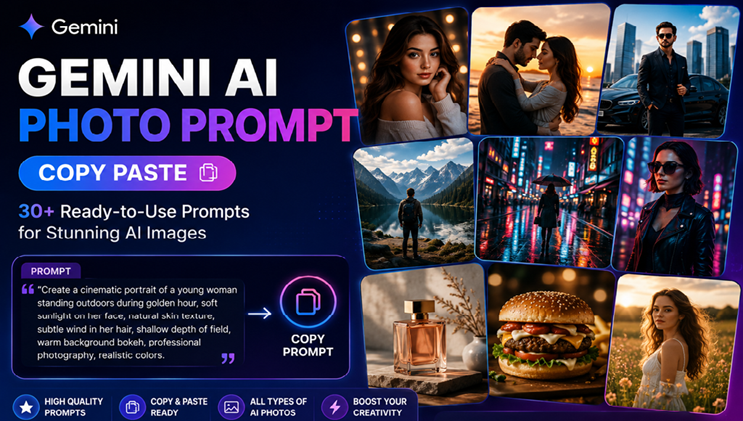

Creating impressive AI photos does not always require complicated instructions. A well-written prompt can give Gemini a clear idea of the subject, setting, lighting, mood, composition, and visual style you want. If you’re searching for Gemini AI photo prompt copy paste ideas, you’ve come to the right place. This guide brings together a collection of original prompts that you can copy, customize, and use as starting points for your own creations.
Gemini can generate and refine images from natural-language instructions. Google’s current Gemini help documentation recommends starting prompts with words such as “draw,” “generate,” or “create.” It also recommends describing the visual style, subject, action, and background in detail.
That makes detailed prompt writing especially useful when you want more control over an AI-generated image.
Whether you want a realistic portrait, romantic couple photo, cinematic scene, fashion editorial, travel image, or creative social media visual, the prompts below can help you get started.
What Is a Gemini AI Photo Prompt?
A Gemini AI photo prompt is a written instruction that tells Gemini what kind of image you want to create or edit.
A simple prompt might say:
Create a realistic portrait of a young woman standing outdoors.
A stronger prompt provides more visual direction:
Create a photorealistic portrait of a young woman standing beside a quiet lakeside at golden hour, soft warm sunlight on her face, natural skin texture, subtle wind in her hair, shallow depth of field, realistic colors, and a cinematic photography style.
The second example gives Gemini more information to work with.
A useful prompt can describe:
- Subject
- Clothing
- Pose
- Facial expression
- Location
- Background
- Lighting
- Camera perspective
- Color palette
- Mood
- Image style
- Composition
The goal is not simply to make a prompt longer. The goal is to make it clearer and more intentional.
How to Use Gemini AI Photo Prompts
Using these prompts is simple.
- Open Gemini.
- Choose the image-generation experience available to you.
- Copy one of the prompts below.
- Paste it into Gemini.
- Generate the image.
- Review the result.
- Ask Gemini to make specific changes if needed.
Google currently documents image generation and editing in Gemini Apps, including generating new images, uploading images for editing, and making changes to previously generated images. Availability can vary by account, age, language, country, and product experience.
You can also refine a result instead of starting over.
For example:
Make the lighting warmer and move the subject slightly to the left.
Or:
Keep the person’s face and clothing unchanged, but replace the background with a modern city street at night.
This conversational approach can make image refinement much easier.
30+ Gemini AI Photo Prompt Copy Paste Ideas
Below are ready-to-use prompts for different creative situations. You can copy them as written or replace specific details with your own preferences.
1. Ultra-Realistic Portrait Prompt
Prompt:
Create an ultra-realistic portrait of a stylish young woman standing outdoors during golden hour. Natural skin texture, realistic facial details, soft sunlight across her face, subtle wind in her hair, elegant casual clothing, shallow depth of field, warm background bokeh, professional portrait photography, realistic colors, natural expression, high visual detail.
Best for: Realistic portraits and profile images.
2. Cinematic Male Portrait
Prompt:
Create a cinematic portrait of a confident young man standing on a downtown street at blue hour. He is wearing a tailored dark jacket over a simple shirt. Moody cinematic lighting, subtle reflections from city lights, realistic skin texture, shallow depth of field, natural pose, dramatic atmosphere, professional photography composition.
3. Romantic Couple Photo
Prompt:
Create a romantic photo of a young couple walking together beside a beautiful lake during sunset. They are smiling naturally and looking at each other. Warm golden-hour lighting, soft reflections on the water, gentle breeze, realistic skin texture, natural clothing, cinematic composition, emotional atmosphere, photorealistic photography.
4. Luxury Lifestyle Prompt
Prompt:
Create a sophisticated lifestyle photograph of a confident man standing beside a luxury sports car outside a modern architectural building at sunset. Elegant black outfit, dramatic warm lighting, polished surfaces, realistic reflections, cinematic depth of field, premium editorial photography style, natural pose, highly detailed environment.
5. Fashion Editorial Prompt
Prompt:
Create a high-end fashion editorial photograph featuring a stylish model walking through a modern city street. Contemporary designer-inspired clothing, confident pose, soft directional lighting, realistic fabric texture, sophisticated composition, subtle background blur, luxury magazine photography aesthetic, natural skin texture and realistic proportions.
6. Wedding Photography Prompt
Prompt:
Create an elegant wedding photograph of a newly married couple standing in a beautiful outdoor garden. Soft evening light, delicate flowers, natural smiles, elegant wedding clothing, realistic skin tones, subtle background bokeh, romantic atmosphere, professional wedding photography, refined composition.
7. Professional Headshot
Prompt:
Create a professional corporate headshot of a confident business professional wearing a tailored navy suit. Neutral modern office background, soft studio lighting, natural facial expression, realistic skin texture, sharp eyes, subtle depth of field, clean composition, professional photography style.
8. Street Photography Prompt
Prompt:
Create a realistic street photography scene in New York City after light rain. Reflections from storefront lights appear on the wet pavement. People walk naturally through the scene while yellow taxis move through traffic. Atmospheric evening lighting, realistic architecture, documentary photography style, natural colors, cinematic depth.
9. Golden Hour Portrait
Prompt:
Create a beautiful outdoor portrait during golden hour. The subject is standing in a field surrounded by tall grass and wildflowers. Warm sunlight creates a soft glow around the subject, with natural skin texture, gentle shadows, realistic hair details, creamy background bokeh, and professional photography composition.
10. Black and White Portrait
Prompt:
Create a timeless black-and-white portrait of a thoughtful young man standing beside a large window. Strong natural side lighting, detailed facial features, subtle shadows, realistic skin texture, classic editorial photography, rich tonal range, minimal background, emotional and sophisticated mood.
11. AI Travel Photo Prompt
Create a photorealistic travel photograph of a traveler standing on a scenic mountain overlook during sunrise. Vast mountains stretch into the distance, soft clouds fill the valley, warm morning sunlight illuminates the landscape, realistic clothing and natural pose, cinematic travel photography, detailed environment.
12. Beach Vacation Prompt
Create a realistic vacation photograph of a young couple walking barefoot along a tropical beach during sunset. Gentle ocean waves, warm orange sky, natural smiles, relaxed clothing, realistic reflections on wet sand, soft cinematic lighting, authentic travel photography style.
13. Rainy City Prompt
Create a cinematic photograph of a person walking through a modern city during a rainy evening. Wet streets reflect colorful lights, transparent umbrellas appear throughout the scene, soft atmospheric fog surrounds distant buildings, realistic clothing textures, dramatic lighting, photorealistic urban photography.
14. Luxury Hotel Prompt
Create a premium lifestyle photograph of a person relaxing inside a luxurious modern hotel suite overlooking a city skyline at night. Elegant interior design, warm ambient lighting, floor-to-ceiling windows, realistic materials, sophisticated atmosphere, professional interior and lifestyle photography.
15. Coffee Shop Portrait
Create a natural lifestyle portrait of a young woman sitting beside a large window in a cozy modern coffee shop. Morning sunlight enters through the glass, a coffee cup sits on the table, warm interior tones, realistic skin texture, casual clothing, shallow depth of field, authentic lifestyle photography.
16. AI Photo Editing Prompt
Edit the uploaded photograph while preserving the person’s identity, facial features, clothing, pose, and natural proportions. Replace the existing background with a clean modern city environment during golden hour. Match the lighting, shadows, perspective, and color temperature so the final image looks naturally photographed.
17. Background Replacement Prompt
Keep the main subject exactly as shown in the uploaded image. Replace only the background with a beautiful mountain landscape during sunrise. Match the original lighting direction, shadows, perspective, and color balance. Preserve natural edges around the subject and create a realistic photographic result.
18. Professional Profile Photo
Transform the uploaded photo into a polished professional profile portrait. Preserve the person’s facial identity and natural appearance. Use a clean neutral background, soft studio lighting, realistic skin texture, subtle depth of field, and professional corporate photography composition.
19. Instagram-Style Lifestyle Photo
Create a stylish lifestyle photograph designed for social media. Show a young creator walking through a modern downtown neighborhood with a coffee cup and casual premium clothing. Soft morning light, natural expression, realistic environment, fashionable composition, subtle depth of field, polished editorial photography.
20. Luxury Car Photography
Create a cinematic automotive photograph of a luxury sports car parked beside a modern glass building at sunset. Dramatic reflections on the vehicle, realistic metallic paint, warm directional lighting, detailed architecture, low camera angle, cinematic composition, professional automotive photography.
21. Fantasy Portrait
Create a photorealistic fantasy portrait of a mysterious warrior standing in an ancient forest. Detailed fantasy clothing, subtle glowing elements, mist between the trees, dramatic moonlight, realistic skin and fabric textures, cinematic atmosphere, rich environmental details, professional concept art photography.
22. Futuristic Cyberpunk Scene
Create a cinematic cyberpunk photograph of a person walking through a futuristic city at night. Neon signs illuminate rain-soaked streets, holographic advertisements appear on buildings, flying vehicles move in the distance, realistic reflections, atmospheric fog, detailed architecture, dramatic cinematic lighting.
23. Vintage Photography Prompt
Create a vintage-inspired photograph of a person standing outside an old roadside diner during the 1970s. Classic clothing, warm muted colors, subtle film grain, authentic period details, natural lighting, realistic composition, nostalgic documentary photography style.
24. Studio Fashion Portrait
Create a professional studio fashion portrait featuring a confident model wearing an elegant contemporary outfit. Clean studio background, softbox lighting, precise shadows, realistic fabric texture, natural skin details, sophisticated pose, premium fashion magazine aesthetic.
25. Product Photography Prompt
Create a professional product photograph of a premium skincare bottle placed on a minimalist stone surface. Soft studio lighting, subtle shadows, realistic glass reflections, elegant neutral background, clean composition, luxury advertising photography, sharp product details.
26. Food Photography Prompt
Create a mouthwatering professional food photograph of a gourmet burger served on a rustic wooden table. Soft natural restaurant lighting, realistic textures, crisp ingredients, subtle background blur, detailed presentation, appetizing composition, premium food photography style.
27. Nature Photography Prompt
Create a breathtaking photorealistic landscape of a peaceful mountain lake surrounded by pine forests during early morning. Mist floats above the water, snow-covered peaks appear in the distance, soft sunlight illuminates the scene, realistic reflections, cinematic landscape photography.
28. Sunset Silhouette Prompt
Create a cinematic silhouette photograph of a person standing on a beach during sunset. The sun is low on the horizon, creating a dramatic orange and purple sky. Gentle ocean waves reflect the remaining light, strong silhouette, balanced composition, realistic photography.
29. Creative Album Cover Prompt
Create a sophisticated conceptual album-cover image featuring a solitary figure standing beneath a dramatic night sky. Minimal composition, atmospheric lighting, subtle visual symbolism, deep contrast, cinematic photography, modern editorial design, clean space suitable for title placement.
30. Viral Social Media Photo Prompt
Create a visually striking social media photograph with a polished cinematic aesthetic. Feature a stylish young creator in a visually interesting urban environment, dramatic but natural lighting, realistic details, modern clothing, strong composition, subtle background blur, authentic expression, premium photography quality.
31. Cinematic Travel Couple Prompt
Create a cinematic travel photograph of a couple standing on a cliff overlooking a dramatic coastal landscape at sunset. Natural body language, wind moving their clothing slightly, warm sunlight, realistic ocean textures, detailed environment, wide cinematic composition, premium travel photography aesthetic.
32. Creative AI Photo Prompt
Create an imaginative editorial photograph combining realistic human photography with subtle surreal elements. Place the subject in a dreamlike environment with floating architectural structures, soft atmospheric lighting, realistic textures, cinematic depth, balanced composition, sophisticated visual storytelling.
How to Make Gemini AI Photo Prompts Better
Copy-and-paste prompts are useful, but customization can make them much more effective.
Instead of simply using:
Create a portrait of a woman.
Add meaningful visual information.
For example:
Create a realistic outdoor portrait of a young woman wearing a cream-colored jacket, standing beside a quiet lake at golden hour. Use warm natural sunlight, subtle wind in her hair, realistic skin texture, shallow depth of field, soft background bokeh, and a natural expression.
The second prompt gives Gemini much more direction.
Google’s own guidance recommends describing the image style and providing details about the subject, what the subject is doing, and the surrounding setting.
A Simple Gemini Prompt Formula
You can build your own prompts using this structure:
Subject + Action + Location + Style + Lighting + Composition + Details
For example:
A young woman + walking through a city street + downtown New York + cinematic photography + golden-hour lighting + medium shot + realistic skin and clothing texture
This produces a much more useful instruction than a vague description.
How to Customize a Copy-and-Paste Prompt
You don’t need to rewrite the entire prompt.
Simply change specific elements.
Change the subject
Replace:
young woman
with:
young man
or:
professional model
Change the location
Replace:
modern city street
with:
tropical beach
or:
mountain village
Change the lighting
Try:
- Golden hour
- Soft morning light
- Studio lighting
- Dramatic evening light
- Moody low-key lighting
- Natural window light
Change the visual style
Try:
- Photorealistic
- Cinematic
- Editorial
- Documentary
- Vintage
- Minimalist
- Fantasy
This lets you create many variations from a single base prompt.
Gemini AI Photo Prompts for Social Media
Social media images often benefit from a clear subject and strong composition.
For Instagram, Pinterest, TikTok thumbnails, or other visual platforms, try prompts that emphasize:
- Strong composition
- Clear subject
- Attractive lighting
- Clean background
- Vertical framing
- Natural expressions
- Visually interesting environments
For example:
Create a polished vertical lifestyle photograph of a young creator standing on a stylish downtown street during golden hour. Modern casual clothing, natural expression, warm sunlight, realistic skin texture, subtle background blur, clean composition, premium social media photography aesthetic.
You can then ask Gemini to modify the composition for your preferred platform.
Gemini AI Photo Editing Prompts
Gemini can also be used to refine existing images. Google’s current documentation explains that users can upload an image and ask Gemini to make edits, or modify an image that Gemini previously generated.
Some useful editing instructions include:
Remove the people in the background while preserving the main subject.
Change the background to a sunset beach while keeping the subject unchanged.
Improve the lighting while keeping the person’s natural skin texture.
Turn the background into a modern luxury hotel lobby.
Change the clothing color while preserving the person’s face and pose.
The more specific the requested change, the easier it is to communicate your intended result.
Tips for Getting Better Results
1. Be specific
Instead of:
Create a nice photo.
Try:
Create a realistic outdoor portrait with soft golden-hour lighting, shallow depth of field, and natural skin texture.
2. Describe the environment
The background can dramatically change the final image.
Mention the location, architecture, weather, landscape, or surrounding objects when they matter.
3. Mention the lighting
Lighting affects the mood and realism of a photograph.
Try terms such as:
- Soft daylight
- Golden hour
- Studio light
- Neon lighting
- Window light
- Dramatic backlighting
4. Describe the composition
You can request:
- Close-up portrait
- Medium shot
- Full-body photograph
- Wide-angle scene
- Low-angle perspective
- Over-the-shoulder composition
5. Refine instead of restarting
If the first result is close but not perfect, give Gemini a targeted follow-up instruction.
For example:
Keep everything the same, but make the background less crowded and increase the warmth of the sunset.
This can be more efficient than writing an entirely new prompt.
Common Mistakes to Avoid
Even a detailed prompt can produce disappointing results if the instructions conflict with each other.
Avoid putting too many unrelated ideas into one prompt.
For example, asking for:
A realistic documentary photograph with cartoon characters, an oil painting background, futuristic architecture, vintage film colors, and a minimalist studio setup.
The conflicting styles can make the result unpredictable.
Instead, choose one primary visual direction and build around it.
Also avoid adding unnecessary technical terms simply because they sound sophisticated. Clarity is usually more useful than keyword stuffing inside an image prompt.
Are These Gemini AI Photo Prompt Copy Paste are Free?
Yes. The prompts in this article are provided as original examples for you to copy, customize, and experiment with.
However, the availability of Gemini’s image-generation features can vary by product, account, location, language, and age requirements. Google’s terms and policies also apply to generated content. Google specifically advises users to consider copyright and privacy rights when creating or publishing AI-generated images.
If you’re creating an image of a real person, make sure you have the appropriate permission and rights to use their photo.
(FAQs) About Gemini AI Photo Prompt Copy Paste
What is the best Gemini AI photo prompt?
There is no single best prompt for every situation. A strong prompt clearly describes the subject, setting, style, lighting, composition, and important visual details.
Can I copy and paste these Gemini AI prompts?
Yes. You can copy the prompts and customize details such as the subject, location, clothing, lighting, and style.
How do I create realistic photos with Gemini AI?
Use specific descriptions of the subject, environment, lighting, pose, and photographic style. Asking for natural textures and realistic proportions can also help communicate the desired look.
Can Gemini edit an existing photo?
Yes. Google’s current Gemini documentation supports uploading images and asking Gemini to make edits in supported experiences.
Can I use Gemini AI prompts for Instagram photos?
Yes. You can create prompts specifically for lifestyle photography, portraits, fashion images, travel visuals, and other social media content.
How long should a Gemini AI photo prompt be?
There is no ideal word count. Use enough detail to communicate the image clearly, but avoid unnecessary or conflicting instructions.
Can I change these prompts?
Absolutely. Customization is encouraged. Replace the subject, location, clothing, lighting, colors, or photography style to create a different result.
Why does my Gemini image not look realistic?
Your prompt may be too vague or contain conflicting instructions. Add details about lighting, environment, subject, composition, and desired visual style.
Can Gemini create photo-editing prompts?
Yes. You can give Gemini an existing image and describe the changes you want in supported experiences.
Does Gemini support AI image generation?
Yes. Google currently documents image generation and editing within Gemini Apps, with the specific experience and availability varying by account and location.
Final Thoughts: Gemini AI Photo Prompt Copy Paste
Finding the right Gemini AI photo prompt copy paste can save time, especially when you’re experimenting with AI image generation for the first time. But the best results usually come from treating a prompt as a creative starting point rather than a fixed command.
Start with one of the prompts in this guide. Copy it into Gemini, generate your image, and then refine the details that matter most. Change the location, lighting, clothing, composition, or mood until the result matches your idea.
For creators, the real advantage is not having one perfect prompt. It is learning how to turn a basic prompt into a reusable template.
At ViralPur.org, our goal is to make that process easier by bringing useful AI prompts, Gemini AI Prompts ideas, image-generation inspiration, and practical AI guides together in one place.
Save this page for future prompt ideas, experiment with different styles, and keep building your own collection of effective Gemini AI prompts.