
The difference between an ordinary AI portrait and a striking one often comes down to the prompt. A few well-chosen details can turn a basic description into a stylish profile picture, a cinematic portrait, or a polished fashion photograph. Google Gemini offers image-generation and editing capabilities in supported experiences. You can describe the image you want, experiment with different styles, and refine the result through follow-up instructions. The available features depend on your account and Google’s current offerings. If you’re searching for the best prompt for Gemini AI boy photos, this guide gives you practical examples you can use right away. Whether you prefer a clean Instagram display picture, a black-hoodie aesthetic, traditional clothing, or dramatic nighttime photography, you’ll find prompts for different looks and occasions.
You’ll also learn how to write more effective instructions, correct common image problems, and choose the right composition for your intended platform.
Also Read: Holi AI Photo Editing Prompt
What Is a Gemini AI Boy Photo Prompt?
A Gemini AI boy photo prompt is a written description that tells an AI image generator what kind of portrait or scene to create.
It can include the subject’s appearance, hairstyle, clothing, pose, lighting, background, and photography style. The more clearly you describe your goal, the easier it is to guide the image toward your preferred look.
For example, typing “create a cool boy photo” leaves many details open to interpretation. A more specific instruction might describe a young adult man in a black hoodie, standing beside a concrete wall under soft evening light.
That additional context gives the image generator a clearer visual direction. It doesn’t guarantee a perfect result, but it can reduce guesswork and make revisions easier.
What Makes a Good Prompt?
A well-written prompt usually covers six essential elements:
- Subject: Describe the person you want in the image.
- Appearance: Specify the hairstyle, expression, and other relevant visual details.
- Clothing: Choose an outfit that fits the intended style.
- Pose: Explain whether the subject should stand, sit, walk, or look toward the camera.
- Lighting: Select natural daylight, soft studio light, dramatic shadows, or neon illumination.
- Background and style: Identify the setting and desired finish, such as realistic photography, cinematic imagery, or an illustrated avatar.
You don’t need to include every detail every time. Start with the elements that matter most, then refine the image if necessary.
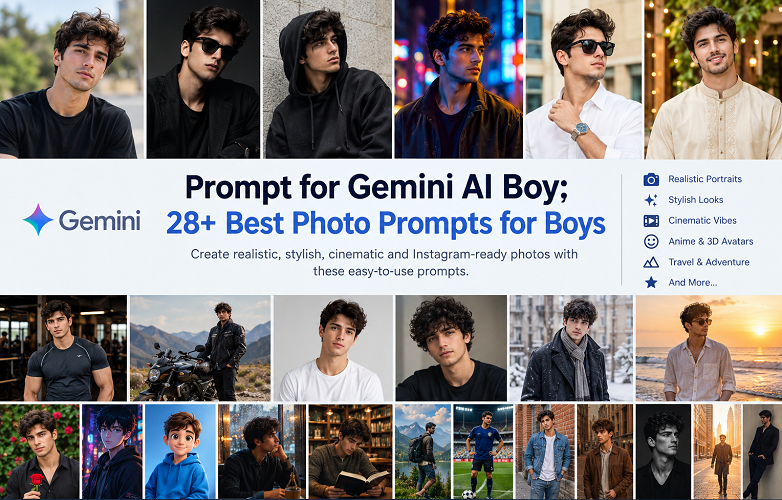
28 Best Prompts for Gemini AI Boy Photos
These ready-to-use prompts cover a range of popular styles. Copy your favourite, paste it into Gemini’s supported image-generation experience, and adjust the details to suit your preferences.
1. Realistic Boy Portrait Prompt
Best for: Natural-looking portraits and everyday profile pictures.
Copy this prompt:
Create a photorealistic portrait of a young adult man with neatly styled hair and a relaxed, natural expression. He wears a simple black T-shirt and stands outdoors against a softly blurred background. Use natural daylight, realistic skin texture, sharp eyes, balanced colors, and professional portrait photography. Keep the composition clean and authentic, with a vertical 4:5 aspect ratio.
2. Stylish Boy Instagram DP Prompt
Best for: Instagram display pictures, Facebook profiles, and social media avatars.
Create a stylish portrait of a young adult man wearing a premium black outfit. Give him a confident expression, a modern hairstyle, and a relaxed pose. Use a minimalist dark background with soft side lighting and subtle shadows. Preserve natural skin texture and realistic facial details. Frame the image from the chest up, with the face clearly visible.
3. Black Hoodie Boy Prompt
Best for: Streetwear enthusiasts and moody profile pictures.
Generate a photorealistic portrait of a young adult man wearing an oversized black hoodie. He stands beside a concrete wall in an urban setting, with his hands in his pockets. Use overcast lighting, muted colors, realistic fabric texture, and a shallow depth of field. Give the photograph the understated look of a modern streetwear campaign.
4. Cinematic Boy Portrait Prompt
Best for: Dramatic profile pictures and cinematic social media posts.
Create a cinematic portrait of a young adult man standing on a city street at night. Blue and amber neon lights reflect on nearby surfaces. He wears a dark casual jacket and has a thoughtful expression. Add realistic shadows, subtle film grain, shallow depth of field, and rich but natural colors. Use a professional movie-still composition with a vertical portrait crop.
5. Handsome Boy With Sunglasses
Best for: Summer portraits and confident fashion looks.
Create a realistic fashion photograph of a young adult man wearing stylish black sunglasses, a crisp white shirt, and a silver wristwatch. He stands outdoors under warm afternoon sunlight, with a modern building softly blurred behind him. Use natural skin texture, accurate reflections on the sunglasses, and clean composition. Give the image a premium lifestyle photography aesthetic.
6. Traditional Outfit Boy Prompt
Best for: Cultural portraits, Eid photos, and festive social media posts.
Create a photorealistic portrait of a young adult man wearing an elegant cream-colored traditional kurta. Place him in a beautifully decorated courtyard with warm ambient lighting and subtle decorative details. Give him a natural smile and a relaxed standing pose. Show realistic fabric folds, authentic colors, and refined portrait photography.
7. Boy in a Suit Prompt
Best for: Professional profiles, formal portraits, and personal branding.
Generate a premium studio portrait of a young adult man wearing a fitted navy-blue suit, a white shirt, and an understated tie. He stands with relaxed shoulders against a charcoal-gray background. Use soft studio lighting, natural skin texture, crisp clothing details, and confident body language. Keep the photograph elegant and suitable for a professional profile.
8. Rainy Night Boy Photography
Best for: Emotional portraits and dramatic nighttime photography.
Create a cinematic photograph of a young adult man standing on a rain-soaked city sidewalk at night. He wears a dark jacket and looks thoughtfully toward the street. Add realistic reflections on wet pavement, soft streetlights, distant bokeh, and gentle rainfall. Use a moody color palette, detailed textures, and natural facial proportions.
9. Boy in Golden Hour Sunlight
Best for: Warm, natural-looking portraits.
Generate a photorealistic portrait of a young adult man standing in an open field during golden hour. Warm sunlight falls softly across his face, creating gentle highlights and natural shadows. He wears a light beige shirt and has a relaxed expression. Use a blurred green background, realistic skin texture, and professional outdoor portrait photography.
10. Luxury Lifestyle Boy Prompt
Best for: Upscale fashion aesthetics and aspirational social posts.
Create an editorial-style photograph of a well-dressed young adult man standing beside a modern luxury car outside a contemporary hotel. He wears a tailored black outfit and a classic wristwatch. Use soft evening light, polished architectural details, realistic materials, and sophisticated composition. Keep the scene believable, with natural proportions and understated luxury.
11. Gym Boy Fitness Portrait
Best for: Fitness profiles and workout motivation posts.
Generate a realistic fitness portrait of an athletic young adult man wearing a fitted dark training shirt in a modern gym. He stands confidently near workout equipment under directional overhead lighting. Show natural muscle definition without exaggeration. Use realistic skin texture, accurate anatomy, detailed clothing, and professional sports photography.
12. Boy on a Motorcycle
Best for: Adventure-themed photos and biker aesthetics.
Create a cinematic photograph of a young adult man standing beside a modern motorcycle on an open road. He wears a black riding jacket, dark jeans, and sturdy boots. Place distant mountains in the background during late-afternoon sunlight. Use realistic motorcycle details, natural proportions, atmospheric depth, and a confident but relaxed pose.
13. Minimalist White Background Portrait
Best for: Clean profile photos and professional use.
Create a high-quality studio portrait of a young adult man wearing a plain white T-shirt against a seamless light-gray background. Use soft, even lighting and a natural expression. Keep the composition simple, with realistic skin texture, clear eyes, accurate facial proportions, and minimal editing. Frame the image from the shoulders up.
14. Boy With Curly Hair
Best for: Hairstyle inspiration and personalised portraits.
Generate a realistic close-up portrait of a young adult man with naturally textured curly hair. He wears a casual dark shirt and looks slightly toward the camera. Use soft window light, a neutral background, realistic individual hair strands, and natural skin detail. Preserve believable facial proportions and avoid excessive smoothing.
15. Winter Fashion Boy
Best for: Cold-weather fashion and seasonal posts.
Create a realistic fashion portrait of a young adult man wearing a charcoal wool coat, a neutral scarf, and dark trousers. He stands on a quiet city street during winter, with softly blurred buildings in the background. Use cool natural light, subtle contrast, detailed wool textures, and a calm editorial mood.
16. Boy at the Beach
Best for: Vacation photos and relaxed summer portraits.
Generate a photorealistic image of a young adult man standing on a beach near sunset. He wears a relaxed linen shirt and neutral trousers. Gentle waves move behind him while warm sunlight creates a soft glow. Use realistic water, natural colors, accurate proportions, and professional travel photography.
17. Boy With a Flower
Best for: Romantic, artistic, and soft-aesthetic portraits.
Create an artistic yet realistic portrait of a young adult man holding a single red rose. He wears a simple dark shirt and stands against a softly blurred garden background. Use gentle natural light, subtle color contrast, detailed petals, realistic facial features, and a thoughtful expression. Keep the overall style elegant and understated.
18. Anime Boy Portrait
Best for: Anime profile pictures and illustrated avatars.
Create a high-quality anime illustration of a stylish young male character with textured dark hair, expressive eyes, and a black streetwear outfit. Place him against a neon-lit city background at night. Use clean linework, detailed shading, dramatic rim lighting, and a modern anime aesthetic. Give the character an original design and a balanced composition.
19. 3D Cartoon Boy Avatar
Best for: Gaming profiles, creative avatars, and casual online identities.
Generate a polished 3D cartoon avatar of a cheerful young male character wearing a blue hoodie and white sneakers. Give him expressive eyes, neatly styled hair, and a friendly smile. Use soft studio lighting, detailed materials, and a simple pastel background. Keep the design original and suitable for a square profile picture.
20. Boy Beside a Rainy Window
Best for: Reflective, emotional, and atmospheric photography.
Create a photorealistic portrait of a young adult man sitting beside a rain-covered window in a quiet cafe. He wears a dark sweater and gazes outside thoughtfully. Use soft natural window light, realistic raindrops, gentle reflections, and a shallow depth of field. Capture subtle emotion without exaggerated facial expressions.
21. Boy With a Book
Best for: Student profiles and intellectual aesthetics.
Generate a natural portrait of a young adult man reading a book in a cozy library. He wears a simple sweater and sits beside a wooden table. Use warm ambient lighting, realistic bookshelves, natural skin tones, and candid editorial photography. Keep the scene peaceful, detailed, and believable.
22. Travel Photography Boy Prompt
Best for: Travel blogs and adventure-themed profiles.
Create a realistic travel photograph of a young adult man standing at a scenic mountain viewpoint. He wears a lightweight jacket, hiking trousers, and a small backpack. Show a sweeping landscape in the background under soft morning light. Use natural colors, realistic atmospheric depth, accurate anatomy, and professional outdoor photography.
23. Football Boy Prompt
Best for: Sports profiles and football-themed social posts.
Generate a dynamic sports portrait of a young adult male football player wearing a modern football kit on a stadium field. He stands confidently with a football near his feet. Use stadium lights, realistic grass, detailed fabric, and dramatic sports photography. Keep the pose natural and avoid distorted hands or inaccurate logos.
24. Boy in a Denim Jacket
Best for: Casual fashion photography.
Create a photorealistic portrait of a young adult man wearing a blue denim jacket over a plain white T-shirt. He stands against a textured brick wall in a lively urban neighborhood. Use natural daylight, subtle shadows, realistic denim details, and relaxed body language. Frame the image as a modern lifestyle photograph.
25. Vintage Film Boy Portrait
Best for: Retro aesthetics and nostalgic social media photos.
Generate a vintage-inspired photograph of a young adult man wearing a classic brown jacket and a cream-colored shirt. Place him on a quiet street with old buildings in the background. Use warm muted tones, subtle film grain, soft highlights, and natural imperfections. Make the image resemble an authentic analog film portrait without excessive scratches or artificial aging.
26. Black-and-White Boy Portrait
Best for: Artistic profile pictures and timeless portraits.
Create a high-contrast black-and-white portrait of a young adult man wearing a simple dark shirt. Use directional studio lighting to emphasize facial structure and natural skin texture. Place him against a plain dark background. Keep his expression calm, his eyes sharp, and the composition clean, with a classic fine-art photography aesthetic.
27. Boy in a City at Sunrise
Best for: Motivational posts and urban lifestyle photography.
Generate a photorealistic image of a young adult man walking through a modern city just after sunrise. He wears a neutral jacket, fitted trousers, and clean sneakers. Warm sunlight reflects off nearby buildings. Use a candid walking pose, realistic shadows, balanced exposure, and cinematic urban photography.
28. Editorial Fashion Magazine Boy
Best for: Fashion portfolios and polished social media content.
Create a premium fashion editorial photograph of a young adult male model wearing a tailored monochrome outfit. Use a minimalist architectural setting, a confident pose, and directional studio-style lighting. Capture detailed fabric textures, natural facial features, clean composition, and sophisticated magazine photography. Avoid artificial skin smoothing and exaggerated proportions.
Comparison Table: Which Gemini AI Boy Prompt Should You Choose?
The right prompt depends on where you plan to use the image. Use this table to find a style that fits your needs.
| Photo style | Best use | Recommended lighting | Suggested aspect ratio |
|---|---|---|---|
| Realistic portrait | Profile picture | Soft daylight | 4:5 |
| Black hoodie | Streetwear DP | Moody side lighting | 4:5 |
| Cinematic portrait | Dramatic social post | Neon or low light | 9:16 |
| Traditional outfit | Festive portrait | Warm ambient light | 4:5 |
| Formal suit | Professional profile | Studio lighting | 4:5 |
| Fitness portrait | Gym profile | Directional lighting | 4:5 |
| Anime avatar | Gaming profile | Dramatically coloured light | 1:1 |
| Travel portrait | Travel content | Natural sunlight | 4:5 |
| Vintage portrait | Retro aesthetic | Soft, warm light | 4:5 |
| Fashion editorial | Portfolio | Controlled studio light | 2:3 |
These aspect ratios are recommendations, not guaranteed output dimensions. The options available depend on the image-generation tool and model.
How to Write the Perfect Prompt for Gemini AI Boy Photos
The prompts above provide a useful starting point. However, understanding how to build your own descriptions gives you more control over the final result.
Google’s image-generation guidance emphasises clear descriptions of the subject, composition, setting, action, and visual style. Conversational follow-up instructions can also help refine an existing image.
1. Describe the Subject Clearly
Start by defining the person you want to show.
Instead of writing “a handsome boy”, describe a young adult man with a specific hairstyle, outfit, expression, and pose.
For example:
Create a photorealistic portrait of a young adult man with short, textured hair, wearing a navy-blue shirt and looking confidently toward the camera.
This gives the image generator more useful information than a broad description alone.
2. Choose Lighting That Fits the Mood
Lighting influences the entire feel of a portrait.
- Golden-hour light: Warm and flattering, especially for outdoor photography.
- Soft window light: Natural and understated.
- Studio lighting: Clean, controlled, and professional.
- Neon lighting: Dramatic and well suited to nighttime scenes.
- Overcast daylight: Gentle contrast for casual portraits.
Choose one main lighting style that supports your intended look. You can introduce additional effects once the basic composition works.
3. Specify the Camera Angle and Composition
Camera direction can change the impact of a portrait.
Try instructions such as:
- “Chest-up portrait with the face centred.”
- “Full-body fashion photograph from a slightly low angle.”
- “Close-up portrait with sharp eyes and a blurred background.”
- “Candid side profile with natural body language.”
- “Wide cinematic shot with the subject positioned on the left.”
For a display picture, prioritise a clearly visible face. For a fashion post, a full-body composition may be more useful.
4. Include Details That Support Realism
If you want a natural-looking image, describe realistic textures and proportions instead of relying on phrases such as “8K ultra quality”.
Useful details include:
- Natural skin texture and believable facial proportions.
- Individual hair strands and realistic fabric folds.
- Accurate shadows and reflections.
- Natural-looking hands and body anatomy.
- A background that matches the lighting on the subject.
These instructions help establish the desired style, although they cannot guarantee flawless anatomy or perfect realism.
5. Refine the Image With Follow-Up Instructions
You don’t always need to rewrite the entire prompt when the first result misses the mark.
Target the specific problem with a short instruction.
| Problem | Follow-up prompt |
|---|---|
| The face looks unnatural. | “Make the facial proportions more natural and preserve realistic skin texture.” |
| The background looks busy. | “Simplify the background and add a gentle blur.” |
| The outfit looks wrong. | “Change the jacket to a plain black hoodie while keeping the rest unchanged.” |
| Lighting is too harsh. | “Soften the lighting and reduce harsh shadows.” |
| Pose looks awkward. | “Adjust the posture to look relaxed and natural.” |
| The image looks overedited. | “Reduce skin smoothing and retain realistic facial details.” |
When editing an existing image, change one or two elements at a time. That makes it easier to see whether each adjustment improves the result.
How to Use These Gemini AI Boy Prompts: Prompt for Gemini AI Boy
Follow these steps to turn a written description into an AI portrait.
Step 1: Open Google Gemini
Visit Google Gemini and sign in. Image-generation options depend on your account, location, age eligibility, and current feature availability.
Step 2: Enter Your Prompt
Copy one of the prompts in this guide and paste it into Gemini’s supported image-generation experience. Adjust the outfit, pose, background, and visual style to match your preferences.
Step 3: Review the Result
Check the face, hands, clothing, lighting, and background. If anything looks unnatural, provide a specific correction rather than changing the entire description.
Step 4: Save Your Favorite
Use the available download option to save the finished image. Check the crop and image quality before using it as a profile picture or publishing it online.
Pros and Cons of Using Gemini AI Boy Prompts: Prompt for Gemini AI Boy
AI image generation offers plenty of creative flexibility, but the results have limitations.
Pros
- Easy customization: Change clothing, hairstyles, backgrounds, and moods through written instructions.
- Variety of styles: Explore realistic photography, anime, cinematic portraits, and fashion concepts.
- Social media potential: Create concepts for profile pictures and personal projects.
- Iterative editing: Refine an existing image with additional instructions.
- Convenience: Develop portrait concepts without arranging a physical photo shoot.
Cons
- Inconsistent results: The same prompt may produce different images across attempts.
- Visual errors: Hands, accessories, text, and facial features may contain noticeable flaws.
- Identity changes: Generated portraits may not accurately match a reference photo.
- Variable feature access: Available models and usage limits depend on your account and current service offerings.
- Privacy considerations: Uploading a personal photo involves sharing it with an online service. Review the applicable privacy terms before proceeding.
Expert Tips for Better Gemini AI Boy Photos: Prompt for Gemini AI Boy
A polished portrait usually comes from clear instructions and thoughtful refinement, not simply a longer prompt.
Keep the Main Subject Consistent
If you want several images of the same fictional character, reuse the original description. Keep the hairstyle, facial features, clothing palette, and general age consistent.
For a personal portrait, upload an appropriate reference image when the feature is available. Ask Gemini to change the background or outfit while preserving recognizable features. The result may still vary between generations or edits.
Avoid Contradictory Instructions
A prompt that requests bright midday sunlight, deep nighttime shadows, and a dark indoor setting may produce an inconsistent scene.
Choose one clear environment and lighting setup. Add secondary effects only after the main composition looks right.
Match the Prompt to the Platform
Think about where the finished image will appear.
- Instagram profile: Use a close portrait with a simple background.
- Instagram Story or Reel cover: Request a vertical composition with enough room around the subject.
- YouTube thumbnail: Use a wide composition with space for a headline.
- LinkedIn profile: Choose professional clothing, natural lighting, and a neutral background.
- Gaming avatar: Use a square crop and a distinctive visual style.
Don’t Rely on Quality Buzzwords Alone
Terms such as “8K,” “masterpiece,” and “ultra HD” can communicate your preferences, but they don’t replace useful visual instructions.
Describe what you actually want to see. A natural expression, believable shadows, and accurate clothing often matter more than a long string of quality labels.
Protect Your Privacy and Use Images Responsibly
Use your own photographs or images you have permission to use. Avoid uploading sensitive photos unnecessarily, and don’t create misleading images that falsely portray a real person doing something they never did.
If you publish AI-generated portraits, follow the relevant platform’s disclosure rules and the applicable terms of the image-generation service.
(FAQs): About Prompt for Gemini AI Boy
1. What is the best prompt for Gemini AI boy photos?
A detailed prompt describing the subject, outfit, pose, lighting, background, and photography style is a strong starting point. For a realistic portrait, try natural daylight, authentic skin texture, a relaxed expression, and a softly blurred background.
2. How do I make a realistic boy photo with Gemini AI?
Describe the image as a photorealistic portrait of a young adult man. Specify natural skin texture, realistic facial proportions, soft lighting, detailed clothing, and a believable setting. Review the result and request corrections where needed.
3. Can I use Gemini AI prompts for Instagram DP photos?
Yes. Request a centered headshot, a clearly visible face, flattering lighting, and a simple background. A square crop works well for many profile pictures, while a 4:5 portrait provides more room for fashion details.
4. Can Gemini AI edit my existing photo?
Gemini supports image editing in eligible experiences. Depending on the features available to you, you may be able to upload a photo and request changes to the background, clothing, or other visual details. Availability and restrictions can vary.
5. How can I create a stylish boy photo with a black hoodie?
Describe an oversized black hoodie, a relaxed pose, an urban background, and soft directional lighting. Add realistic fabric texture and muted colors for a modern streetwear aesthetic.
6. Which Gemini AI boy prompt works best for a cinematic look?
Choose a nighttime setting, neon lighting, dramatic shadows, shallow depth of field, and a thoughtful expression. Keep the lighting and color palette consistent to create a cohesive cinematic effect.
7. Can Gemini AI generate anime-style boy photos?
You can request anime-inspired illustrations featuring original characters, expressive eyes, detailed hairstyles, and stylized backgrounds. The result depends on the image-generation model and its available features.
8. Why does Gemini sometimes produce a different face?
AI image generation doesn’t always reproduce facial details consistently. Changes in wording, pose, camera angle, and lighting can affect the result. When supported, use a reference image and request that recognizable features remain consistent.
9. Are Gemini AI boy photos free to create?
Access depends on Google’s current Gemini offering, your account, and applicable usage limits. Some image-generation features may be available without a paid subscription, while additional capabilities may require a Google AI plan. Check the official Gemini Help Center for current information.
10. Can I use Gemini AI boy photos commercially?
Commercial use depends on the applicable service terms, the content you create, and any third-party rights involved. Review Google’s current terms and ensure your image doesn’t infringe copyright, privacy, or other rights before using it commercially.
Conclusion: Prompt for Gemini AI Boy
The best prompt for Gemini AI boy photos starts with a clear idea of the image you want. Describe the subject, choose an appropriate outfit, establish the lighting, and provide a background that supports the overall style.
Start with one of the 28 prompts in this guide. Choose a realistic profile picture, a cinematic portrait, a traditional outfit, or a modern streetwear look. Then refine the details until the image matches your vision.
If the first result isn’t quite right, don’t start over immediately. A focused follow-up instruction can help correct the lighting, simplify the background, or improve the pose.
Experiment with different styles, keep your descriptions consistent, and pay attention to natural-looking details. With a thoughtful prompt and a little refinement, you can create portraits that feel more personal and better suited to your social media profiles or creative projects.