
A great Instagram photo can make someone pause mid-scroll. Sometimes, all it takes is the right lighting, a fresh visual style, or an unexpected creative detail. With AI-powered image tools, experimenting with these ideas has become easier than ever. An Instagram trending prompt gives an AI tool clear instructions for creating a particular image, editing a photograph, or developing a content idea. Creators use prompts to produce cinematic portraits, stylish fashion images, vintage photographs, travel visuals, and other content inspired by popular social media aesthetics.
The difference between an ordinary prompt and a useful one comes down to detail. Describing the subject, lighting, background, composition, and mood gives the tool a clearer creative direction. When editing an existing photo, instructions about preserving the person’s identity can also make a difference.
This guide covers ready-to-use Instagram trending prompts, practical editing techniques, caption ideas, and tips for creating original content. Whether you’re building a personal profile, growing a creator account, or promoting a business, you’ll find ideas you can adapt to your needs.
Also Read: New ChatGPT Trend Prompt
What Is an Instagram Trending Prompt?
An Instagram trending prompt is a written instruction used to create content inspired by a particular visual style, editing technique, or social media format.
For example, you might ask an AI tool to turn a casual portrait into a cinematic photograph with warm lighting and a softly blurred city background. Another prompt might help you develop Reel ideas, write captions, or plan an educational carousel.
These prompts serve several purposes:
- Generate AI portraits and fashion photography.
- Edit existing photographs with a specific visual style.
- Develop creative Instagram Reel concepts.
- Plan travel, fitness, lifestyle, and product content.
- Write captions, opening hooks, and carousel outlines.
- Maintain a consistent look across multiple posts.
Not every prompt needs AI. Photographers can use prompts as creative briefs, while designers and social media managers can use them to plan campaigns.
The goal is simple: describe the result you want instead of leaving every creative decision to chance.
Why Instagram Trending Prompts Are Popular
AI-assisted editing gives creators more room to experiment without arranging a new photoshoot for every idea. A single reference photo can inspire several different looks, depending on the tool and the instructions.
They Make Creative Editing More Accessible
You don’t need advanced photography or editing skills to describe a visual concept. Many AI tools understand everyday language and use it to guide image generation or editing.
For instance, you could request soft window lighting, natural skin texture, a neutral background, and an editorial photography style. The resulting image will depend on the tool, the source photograph, and how well it interprets your instructions.
They Help Creators Explore Different Styles.
One photograph can take on several distinct moods. You might prefer vintage film for a nostalgic post, dramatic lighting for a cinematic portrait, or bright colours for a fashion feature.
Testing different approaches helps you decide which style fits your personality and audience.
They Support Consistent Branding.
A recognisable visual style can help an account feel more cohesive. Creators can reuse descriptions of their preferred lighting, colours, composition, and mood across multiple images.
A skincare brand, for example, might favour soft daylight, clean backgrounds, subtle textures, and minimal styling. A gaming creator might prefer neon accents and dramatic contrast.
They Encourage Original Ideas.
Prompts make it easier to experiment with combinations you might not have considered. You can change the setting, clothing, camera angle, or colour palette until the result feels right.
Still, attractive visuals alone won’t guarantee more reach. Audience interest, content relevance, viewer behaviour, and Instagram’s recommendation systems also influence performance.
Best Instagram Trending Prompts for AI Photos
The following prompts work as starting points for compatible AI image generators and photo-editing tools. Copy one, replace the details where necessary, and adjust the instructions to match your preferred look.
1. Cinematic Portrait Prompt
A cinematic portrait brings the mood of a film still to an otherwise ordinary photograph. Controlled lighting, a detailed background, and shallow depth of field can create a more dramatic result.
Copy-and-use prompt:
Create a realistic cinematic portrait of the person in the reference photo. Use soft directional lighting, a dark urban background, subtle shadows, natural skin texture, and shallow depth of field. Preserve the person’s facial features, hairstyle, and recognizable identity. Use balanced colors, professional portrait photography, and a natural expression. Avoid excessive retouching, artificial-looking skin, and distorted facial details.
Best for: Profile pictures, personal branding, and editorial-style posts.
2. Luxury Lifestyle Prompt
Luxury-inspired photography relies on refined styling, elegant surroundings, and thoughtful composition. You can create this look without pretending to own expensive items or visit places you haven’t actually visited.
Prompt:
Create an elegant lifestyle photograph featuring the person in the reference image wearing a tailored outfit in a sophisticated modern setting. Use warm ambient lighting, refined neutral colors, realistic fabric details, and natural body proportions. Include tasteful architectural elements and a premium editorial photography style. Preserve the person’s recognizable facial features and keep the scene believable.
Best for: Fashion creators, lifestyle accounts, and personal branding.
3. Streetwear Fashion Prompt
Streetwear photography pairs expressive outfits with urban surroundings. The result can feel relaxed, contemporary, and full of personality.
Prompt:
Edit this portrait into a contemporary streetwear fashion photograph. Preserve the person’s identity and facial features. Add a stylish layered outfit, a clean urban background, natural daylight, realistic fabric textures, and confident body language. Use dynamic composition and subtle film grain. Maintain accurate hands, realistic proportions, and a believable photographic finish.
Best for: Men’s fashion, outfit inspiration, and youth lifestyle content.
4. Vintage Film Photography Prompt
Vintage-inspired images bring a sense of nostalgia to personal portraits and travel memories. Muted colors and subtle grain can create the look of analog photography without making the image appear damaged.
Prompt:
Give this photograph a natural vintage film aesthetic. Use muted colors, gentle highlights, subtle grain, slightly faded shadows, and soft natural lighting. Preserve the original subject, facial features, clothing, and composition. Make the image resemble a carefully scanned analog photograph without excessive blur or artificial aging.
Best for: Nostalgic posts, travel photos, and personal storytelling.
5. Golden-Hour Portrait Prompt
Golden hour occurs shortly after sunrise and before sunset, when sunlight often appears softer and warmer. This lighting can add depth to outdoor portraits without requiring elaborate equipment.
Prompt:
Create a photorealistic outdoor portrait during golden hour. Use warm sunlight, soft shadows, natural skin tones, a gently blurred background, and realistic hair detail. Preserve the person’s identity and original facial structure. Add subtle environmental depth and professional portrait composition. Avoid oversaturated orange tones, excessive skin smoothing, and unnatural lighting.
Best for: Travel profiles, outdoor portraits, and lifestyle creators.
6. Minimalist Profile Picture Prompt
A profile picture should make the subject easy to recognize, even when displayed at a small size. A simple background and clear framing help keep attention where it belongs.
Prompt:
Create a clean, professional profile portrait based on the reference photo. Use a simple, uncluttered background, balanced lighting, natural skin texture, and a relaxed expression. Preserve the person’s facial features and identity. Frame the head and shoulders clearly, leaving enough space for a square crop. Avoid heavy filters, distracting objects, and exaggerated facial edits.
Best for: Personal profiles, freelancers, and professional accounts.
7. Travel Photography Prompt
Travel photography works best when the subject and setting complement each other. A thoughtful prompt can help balance the person in the foreground with the scenery behind them.
Prompt:
Create a realistic travel photograph featuring the person in the reference image at a scenic destination. Use natural environmental lighting, accurate perspective, believable background details, and balanced colors. Preserve the person’s identity and realistic proportions. Compose the scene like a professional travel editorial, with the subject clearly visible and the location providing context. Do not add fictional landmarks or misleading location details.
Best for: Travel creators, vacation carousels, and destination guides.
8. Black-and-White Editorial Prompt
Removing colour draws attention to expression, contrast, shape, and texture. This approach suits portraits that need a timeless, understated appearance.
Prompt:
Transform this portrait into a refined black-and-white editorial photograph. Use controlled contrast, detailed shadows, soft highlights, realistic skin texture, and a simple background. Preserve the person’s identity, expression, and facial proportions. Create a timeless photographic finish with natural tonal transitions. Avoid crushed shadows, artificial skin texture, and excessive sharpening.
Best for: Artistic portraits, fashion profiles, and photography portfolios.
9. Fitness Motivation Prompt
Fitness creators often use photography to document training, celebrate progress, and share workout routines. Realistic images tend to communicate these stories more credibly than exaggerated transformations.
Prompt:
Create a realistic fitness portrait of the person in the reference image in a clean, well-lit gym. Use natural athletic posture, realistic muscle definition, accurate body proportions, and believable gym equipment. Preserve the person’s identity and physical characteristics. Use crisp lighting and professional sports photography without exaggerated muscles or unrealistic body changes.
Best for: Fitness creators, workout updates, and training motivation.
10. Dreamy Aesthetic Prompt
Dreamy portraits use diffused light, gentle colours, and atmospheric backgrounds to create a softer visual mood. The trick is keeping the effect subtle enough to preserve the subject’s details.
Prompt:
Create a dreamy editorial portrait with soft diffused light, pastel tones, delicate highlights, and a subtly blurred background. Preserve the subject’s recognizable identity, natural skin texture, and realistic proportions. Use a calm composition with gentle atmospheric depth. Keep the result polished but believable, avoiding excessive glow, distorted details, or artificial facial changes.
Best for: Aesthetic feeds, creative portfolios, and mood boards.
Instagram Trending Prompts for Reels and Captions: Instagram Trending Prompt
Strong Instagram content doesn’t begin and end with photographs. Reels, captions, and carousels can benefit from the same clear creative direction.
Reel Idea Prompt
Use this prompt to develop short-form video concepts for your niche.
Generate 10 original Instagram Reel ideas for a creator in the [your niche] category. Each idea should include a compelling opening hook, a simple filming plan, suggested on-screen text, a natural ending, and a relevant call to action. Prioritize practical ideas that can be filmed with a smartphone. Avoid misleading claims, copied viral concepts, and engagement bait.
Replace the placeholder with fashion, fitness, travel, food, gaming, technology, or another topic. Review the ideas and choose those that match your audience and available resources.
Instagram Caption Prompt
A caption should add context or personality rather than repeat the image’s obvious details.
Write five natural Instagram captions for a post about [describe the photo or topic]. Use a friendly American English tone. Make each caption distinct and easy to read. Include one short option, one storytelling option, and one question-based option. Suggest a few relevant hashtags without keyword stuffing or generic engagement bait.
Carousel Content Prompt
Carousels work well when a topic needs several steps, examples, or explanations.
Develop a seven-slide Instagram carousel about [topic]. Give each slide a clear headline and one useful takeaway. Start with a specific, compelling hook and end with a practical next step. Keep the text concise, fact-check factual claims, and make the information useful for the intended audience.
These prompts help turn a single idea into a more complete content plan. Always review AI-generated suggestions for accuracy, originality, and relevance before publishing.
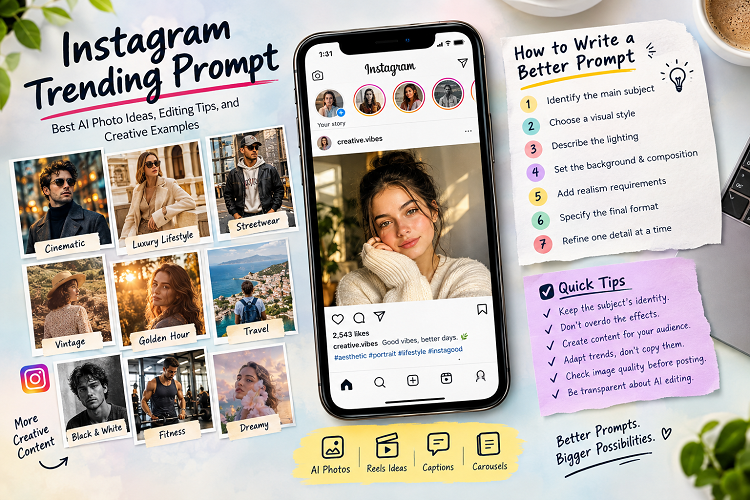
How to Write a Better Instagram Trending Prompt
A useful prompt doesn’t need to be complicated. It needs to communicate the details that matter most.
Step 1: Identify the Main Subject
Start by describing the person, product, or scene. If you’re editing an existing portrait, identify the features that must remain unchanged.
For example, a prompt for a personal profile picture should prioritize facial identity and clear framing. A product image may need accurate packaging and readable labels.
Step 2: Choose a Visual Style
Select a clear direction, such as cinematic portraiture, vintage film, editorial fashion, or minimalist product photography.
Avoid mixing conflicting styles unless you’re deliberately experimenting. A request for both gritty, high-contrast lighting and bright, flat studio illumination may produce an inconsistent result.
Step 3: Describe the Lighting
Lighting affects the image’s mood, contrast, and perceived realism.
Useful descriptions include:
- Soft window light for natural indoor portraits.
- Overcast daylight for even outdoor lighting.
- Golden-hour sunlight for warm, gentle highlights.
- Dramatic side lighting for depth and contrast.
- Clean studio lighting for product photography.
Choose lighting that suits the subject instead of adding effects simply to make the prompt longer.
Step 4: Set the Background and Composition
Describe the environment, camera angle, framing, and depth of field. A profile picture usually benefits from a close crop and an uncluttered background, while a travel image may need a wider composition.
Specific instructions help the tool understand which elements should receive the most attention.
Step 5: Add Realism Requirements
When using a reference photo, state which details should remain consistent. You can request natural skin texture, realistic hands, accurate proportions, and believable shadows.
These instructions can reduce unwanted changes, although no prompt guarantees a flawless result.
Step 6: Specify the Final Format
Consider where the image will appear. A square profile picture, vertical Story, and landscape image require different framing.
Check the current dimensions and aspect-ratio options in your editing tool. Preview the result in its intended placement to catch awkward crops before publishing.
Step 7: Refine One Detail at a Time
If the first result misses the mark, identify the specific problem. Adjust the background, lighting, pose, or color palette rather than changing every instruction at once.
This approach makes revisions easier to evaluate and helps you build a collection of prompts that work for your preferred style.
Comparison Table: Which Prompt Style Should You Choose?
| Prompt style | Best use | Visual direction | Main consideration |
|---|---|---|---|
| Cinematic | Portraits | Dramatic lighting and depth | Keep facial details visible |
| Luxury lifestyle | Fashion and branding | Refined settings and warm tones | Maintain a believable scene |
| Streetwear | Outfit posts | Urban backgrounds and expressive poses | Preserve realistic clothing details |
| Vintage film | Personal and travel photos | Muted colors and subtle grain | Avoid excessive aging effects |
| Golden hour | Outdoor portraits | Warm natural light | Maintain natural skin tones |
| Minimalist | Profile pictures | Clean backgrounds and simple framing | Keep the face clearly visible |
| Travel | Destination content | Environmental storytelling | Represent locations honestly |
| Black and white | Editorial portraits | Contrast and tonal depth | Retain shadow detail |
| Fitness | Training content | Realistic athletic photography | Avoid misleading body alterations |
| Dreamy aesthetic | Creative feeds | Soft light and pastel colors | Prevent excessive blur and glow |
Choose a style based on your content’s purpose and audience. You don’t need to follow every trend to build a recognizable Instagram presence.
Pros and Cons of Using Instagram Trending Prompts
AI prompts offer useful creative options, but they also have limitations worth understanding before you publish the results.
Pros
- Faster planning: A reusable prompt gives you a starting point for future edits.
- More creative freedom: You can test different visual styles without arranging multiple photoshoots.
- Greater consistency: Repeated style instructions can help establish a recognizable feed.
- Lower technical barriers: Many tools accept plain-language editing instructions.
- Flexible content creation: One creative concept can inspire posts, Stories, and promotional graphics.
Cons
- Inconsistent results: Different tools may interpret the same instructions differently.
- Visual errors: AI may distort hands, text, reflections, or background details.
- Changes to identity: Some editing tools may alter facial features or skin texture.
- Repetitive aesthetics: Overusing similar prompts can make several posts look alike.
- Potential costs: Advanced features may require a subscription or impose usage limits.
- Disclosure considerations: Certain realistic AI-generated or altered images may require transparency under platform policies or applicable laws.
The most reliable workflow combines AI assistance with human review. Examine every image carefully before sharing it.
Expert Tips for Getting Better Results: Instagram Trending Prompt
Preserve the Subject’s Identity
When editing a real photograph, ask the tool to retain the person’s facial structure, skin tone, hairstyle, and other recognizable features. Then compare the edited image with the original.
For professional profiles and personal branding, even small changes can affect how authentic a photograph appears.
Don’t Overdo the Effects
Heavy filters can make portraits look artificial. Excessive sharpening, unrealistic skin smoothing, and extreme color changes may undermine the image.
Start with subtle adjustments. Increase their intensity only when the creative direction calls for it.
Create Content That Fits Your Audience
A fashion account needs a different visual approach from a technology blog. Think about what your followers expect before choosing a prompt.
A travel creator might benefit from realistic destination photography. A gaming account could experiment with futuristic portraits, neon lighting, or digital artwork.
Adapt Trends Instead of Copying Them
Popular formats can provide inspiration, but your interpretation should feel distinct. Change the setting, composition, story, or color palette to create a recognizable personal style.
You can also pair familiar visual styles with useful information. A travel portrait, for example, could accompany a practical guide to the destination.
Check Image Quality Before Publishing
Inspect faces, hands, clothing, shadows, and background objects. Look for duplicated details, strange reflections, unreadable text, and inconsistent lighting.
Preview the image at its intended dimensions. A photograph that looks polished on a computer may lose important details after cropping.
Be Transparent About AI Editing
Avoid using an edited image to misrepresent a real event, product, location, or personal achievement. Follow Instagram’s current policies on AI-generated and altered content, along with any applicable disclosure requirements.
If an image depicts a fictional scene, make that clear when viewers could reasonably mistake it for a real photograph.
How to Use an Instagram Trending Prompt Step by Step
Follow this workflow to turn an idea into a finished post.
- Choose your original photo. Select a clear image with good lighting and an unobstructed subject.
- Pick a visual direction. Decide whether you want a cinematic portrait, vintage aesthetic, fashion edit, or another style.
- Copy a suitable prompt. Start with one of the examples in this guide.
- Personalize the instructions. Add details about the background, lighting, clothing, mood, and framing.
- Generate or edit the image. Follow your chosen tool’s instructions for uploading a reference photo.
- Review the result. Correct obvious errors and compare the subject’s appearance with the original.
- Export and preview. Check the crop, image quality, and intended Instagram placement.
- Publish with context. Add a relevant caption and share the image with your intended audience.
The exact process varies by tool. Some applications generate images from scratch, while others edit uploaded photographs. Choose the workflow that best matches your goal.
How to Make an Instagram Post More Engaging: Instagram Trending Prompt
A strong prompt helps with the visual, but the post itself needs a clear purpose.
Start with an image that communicates one main idea. Then write a caption that adds context instead of describing everything viewers can already see.
For example, a creator sharing a cinematic portrait might explain the inspiration behind the photograph, describe the editing process, or share the prompt used to create the effect.
A few additional practices can strengthen your content:
- Write an opening line that gives people a reason to keep reading.
- Use hashtags that accurately describe the subject.
- Add descriptive alternative text when appropriate.
- Choose Reels when motion or a demonstration improves the story.
- Use carousels when multiple images or steps add value.
- Review Instagram Insights to understand how your audience responds.
- Test different creative approaches instead of assuming one style will always perform best.
No prompt can guarantee viral reach. Treat performance as something to measure and improve, not an outcome you can promise.
(FAQs): About Instagram Trending Prompt
1. What is an Instagram trending prompt?
An Instagram trending prompt is an instruction for creating content inspired by a popular visual style or creative format. It can guide AI photo generation, image editing, Reel ideas, captions, and carousel posts.
2. How do I find trending Instagram prompts?
Explore Instagram Reels, creator accounts, relevant hashtags, and recent posts in your niche. Look for recurring visual styles and editing techniques, then develop your own interpretation.
A popular-looking style isn’t necessarily a verified current trend. Check recent examples before describing a particular effect as trending.
3. Which AI tools can I use with Instagram prompts?
You can use compatible AI image generators and photo-editing applications that accept text instructions. Available features vary by product. Some tools generate images from scratch, while others edit uploaded photographs or provide AI-assisted retouching.
Check each tool’s features, pricing, privacy terms, and usage rights before uploading personal images.
4. Can I use an Instagram trending prompt for free?
Yes, provided you have access to a suitable tool with a free tier or free editing features. Some services limit image generation, resolution, or advanced controls unless you pay.
You can also use prompts as creative briefs for manual editing in a conventional photo editor.
5. How do I create realistic AI portraits for Instagram?
Start with a clear reference image. Describe the desired lighting, composition, background, and photographic style, then ask the tool to preserve facial features, natural skin texture, and realistic proportions.
Avoid contradictory instructions and excessive effects. Review the finished image because AI tools can still introduce visual errors.
6. Can I use these prompts for Instagram Reels?
Yes. Adapt the prompts to describe a video concept, opening hook, sequence of shots, on-screen text, and ending. If your tool supports AI video generation, include the intended movement, camera behavior, and scene transitions.
You can also use a prompt to plan footage that you record yourself.
7. Do Instagram trending prompts help increase followers?
They can help you create distinctive, consistent content, but they don’t guarantee follower growth. Results depend on audience relevance, content quality, viewer retention, and whether people choose to share or engage with your posts.
Track performance over time to learn which styles resonate with your audience.
8. What is the best prompt for a male Instagram photo?
A cinematic portrait or streetwear prompt is a good starting point. Describe the outfit, lighting, background, pose, and mood. When editing an existing photo, ask the tool to preserve the person’s identity and realistic proportions.
The best style depends on your preferences and the purpose of the post.
9. Should I use hashtags with AI-generated Instagram photos?
Use relevant hashtags when they help categorize your content and connect it with interested viewers. Terms related to portrait photography, AI art, or streetwear may be appropriate, depending on the image.
Avoid unrelated hashtags simply because they appear popular. Hashtags alone cannot guarantee reach.
10. Can I reuse the same Instagram trending prompt?
Yes. Reusing a prompt can help maintain a consistent visual identity. However, vary the setting, composition, lighting, or subject when you want fresh results.
Save successful prompts in a personal collection so you can reproduce a preferred style without making every post look identical.
Conclusion: Instagram Trending Prompt
An Instagram trending prompt can make creative experimentation easier, whether you’re producing AI portraits, refining photographs, planning Reels, or developing captions. Clear instructions about the subject, lighting, background, composition, and mood help guide the process.
Start with a style that suits your profile. Test a few variations, inspect the results, and refine your prompts based on what works.
Most importantly, use trends as inspiration rather than a substitute for originality. Pair polished visuals with useful captions, authentic storytelling, and content that serves your audience.
With thoughtful planning and careful editing, a simple prompt can become a distinctive Instagram post that reflects your personality, supports your brand, and gives viewers a reason to engage.