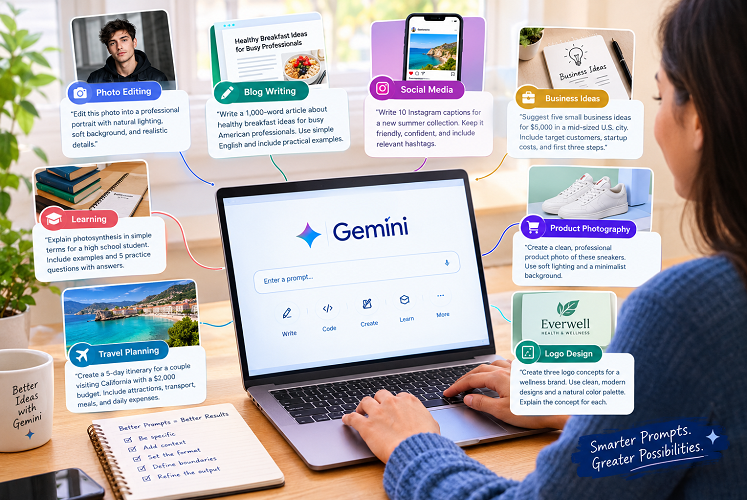

A well-written AI Gemini prompt can turn a simple idea into a polished photograph, an engaging blog post, a creative design, or a useful answer. The difference often comes down to how clearly you explain what you want.
Google Gemini offers tools for writing, research, brainstorming, and image creation, depending on the model and features available to your account. You can use it to develop content, refine ideas, explore visual concepts, and simplify everyday tasks.
Still, the quality of the result depends partly on the instructions you provide. A vague request leaves too much room for interpretation. A specific prompt gives Gemini a clearer picture of your expectations, from the intended audience to the final format.
Consider the difference between asking for a “cool picture” and requesting a cinematic portrait with natural skin texture, soft lighting, a carefully chosen background, and a particular camera angle. The second instruction gives the model a much stronger creative direction.
This guide covers the best AI Gemini prompt examples for photography, SEO writing, social media, business planning, education, and more. You’ll also learn how to refine your instructions, avoid common mistakes, and get results that require less editing.
Also Read: Prompt for Gemini AI Boy
What Is an AI Gemini Prompt?
An AI Gemini prompt is a question, instruction, or description you give Google’s Gemini to complete a task.
You might use one to write an email, summarise a document, explain a difficult subject, plan a vacation, develop a blog outline, or generate an image. The prompt tells Gemini what you need and provides the context required to shape its response.
You don’t need technical language to write a good prompt. Clear, relevant details usually matter more than complicated wording.
For example, compare these two requests:
- Basic prompt: Write a blog post about healthy breakfast ideas.
- Improved prompt: Write a 1,000-word article about healthy breakfast ideas for busy American professionals. Use simple English, practical meal suggestions, descriptive H2 headings, and a friendly, informative tone.
The second version establishes the audience, length, subject, structure, and writing style. That gives Gemini a more useful starting point.
Why Are AI Gemini Prompts So Popular?
People use Gemini prompts to save time, explore ideas, and simplify tasks that would otherwise require considerable effort.
1. Photo Generation and Editing
Image prompts let you describe a photograph’s subject, composition, lighting, background, and visual style.
You can request professional headshots, fashion portraits, cinematic scenes, product photography, or illustrations. Depending on the available features, you can also upload an image and request specific edits.
For example, you might ask Gemini to create a professional portrait with soft studio lighting, a neutral background, natural facial details, and business-casual clothing.
The more clearly you describe the desired changes, the easier it becomes to communicate your vision.
2. Blog Writing and SEO Content
Content creators use Gemini to brainstorm article ideas, build outlines, draft sections, improve readability, and develop FAQs.
A strong writing prompt should identify the target audience, search intent, preferred tone, and article structure. It should also instruct the model to distinguish verified information from claims that need further research.
AI-generated content still needs editorial oversight. Check factual claims, verify statistics, confirm sources, and remove unsupported statements before publication.
3. Social Media Content
Social media managers can use prompts to develop captions, campaign ideas, short video scripts, and content calendars.
A small clothing business, for instance, could request 15 Instagram captions for a new collection. The prompt might specify a U.S. audience, a friendly brand voice, concise wording, and a clear call to action.
The resulting captions provide a starting point that the business can refine to match its identity.
4. Learning and Everyday Productivity
Gemini can help users understand unfamiliar topics, organise information, and plan projects.
You could ask it to explain a difficult concept in plain English, prepare a study schedule, compare possible solutions, or turn meeting notes into an action list.
For consequential decisions, verify the response with reliable sources. A confident answer isn’t necessarily an accurate one.
Best AI Gemini Prompt Examples for 2026
The following prompts cover several popular use cases. Copy the example that fits your needs, replace the bracketed details, and adjust the instructions as necessary.
1. AI Gemini Prompt for Photo Editing
Photo editing prompts work best when they explain both what should change and what must remain untouched.
Prompt for a Realistic Portrait
Copy and use this prompt:
Edit the uploaded photo into a professional, photorealistic portrait. Preserve the person’s identity, facial features, natural skin texture, hairstyle, and expression. Improve the lighting with soft, balanced studio illumination. Use a clean, elegant background with subtle depth of field. Keep the result realistic, sharp, and naturally colored. Avoid excessive skin smoothing, artificial facial changes, and exaggerated effects.
Prompt for a Cinematic Photo
Transform the uploaded photo into a cinematic portrait with warm golden-hour lighting, realistic shadows, and rich but natural colors. Preserve the subject’s original identity, facial structure, pose, and clothing. Add a softly blurred urban background and subtle film-like contrast. Create a polished editorial photograph without making the image look artificial.
Prompt for a Professional Profile Picture
Create a professional headshot from the uploaded photograph. Keep the person’s identity and facial features consistent. Use a neutral background, flattering soft lighting, realistic skin texture, and business-casual clothing. Center the subject and frame the image from the shoulders upward. Make it suitable for LinkedIn and professional websites.
Expert tip: When editing an existing photograph, specify which details must remain unchanged. If the first result misses the mark, request one targeted correction rather than rewriting the entire prompt.
Google’s image-prompting guidance also emphasises describing the subject, composition, action, setting, and visual style.
2. AI Gemini Prompt for Boys’ Photography
Portrait prompts are useful for creating profile pictures, fashion concepts, and social media visuals. The key is to describe the intended look without making the image feel artificial.
Stylish Streetwear Portrait
Create a photorealistic fashion portrait of a young adult man wearing a modern black streetwear outfit, clean sneakers, and minimal accessories. Place him against a contemporary urban wall with subtle architectural details. Use natural afternoon lighting, a confident but relaxed pose, realistic skin texture, and professional fashion photography. Compose the image vertically for Instagram, with the subject clearly visible.
Moody Black Outfit Portrait
Create a cinematic portrait of a young adult man wearing a black jacket and dark trousers. Use dramatic side lighting, a deep charcoal background, and subtle shadows. Keep the facial features realistic and the pose natural. Use a premium editorial photography aesthetic with sharp subject details, controlled contrast, and a clean composition.
Outdoor Lifestyle Portrait
Generate a realistic lifestyle portrait of a young adult man standing in a green park during golden hour. He wears a simple casual shirt and jeans. Use warm sunlight, natural colors, soft background blur, and a relaxed expression. Keep the composition authentic, like a photograph captured by a professional portrait photographer.
If you want the result to resemble you, upload a suitable reference photo when supported. Ask Gemini to preserve your identity while changing the background, clothing, or lighting.
3. AI Gemini Prompt for Blog Writing
Gemini can help bloggers organise ideas, develop article drafts, and improve readability. However, a useful prompt should prioritise accuracy and reader value rather than word count alone.
SEO Article Writing Prompt
Act as an experienced American SEO writer and subject matter researcher. Write an original, informative article about [TOPIC] for a United States audience.
Include an SEO title, meta title, meta description, focus keyphrase, URL slug, introduction, descriptive H2 and H3 headings, relevant examples, a comparison table where appropriate, and eight frequently asked questions.
Use clear American English, short paragraphs, active voice, and natural transitions. Address the reader’s search intent directly. Avoid keyword stuffing, repetition, unsupported claims, and unnecessary filler.
Identify claims that require verification. Use trustworthy, current sources for factual information. Never invent statistics, quotations, expert credentials, or references. Finish with practical takeaways and a concise conclusion.
How to Improve the Draft
The first draft is rarely the final version. Follow up with specific instructions to address its weaknesses.
For example:
- Strengthen the introduction and address the search intent sooner.
- Remove repetitive paragraphs without losing useful information.
- Identify factual claims that need reliable sources.
- Improve the headings and make the article easier to scan.
- Add original examples that help readers apply the advice.
This process turns Gemini into a useful drafting assistant. The writer remains responsible for accuracy, originality, and editorial quality.
4. AI Gemini Prompt for YouTube Thumbnails
An effective YouTube thumbnail communicates one clear idea. Too many visual elements can make the image difficult to understand, especially on a phone screen.
Thumbnail Creation Prompt
Create a bold YouTube thumbnail concept for a video about [VIDEO TOPIC]. Use a clear central subject, strong visual contrast, dramatic but realistic lighting, and a simple background. Leave enough negative space for a short headline. Use a 16:9 landscape composition designed to remain readable on mobile screens. Avoid clutter, tiny details, unnecessary logos, and distracting background objects. If text is included, use exactly this headline: “[HEADLINE].”
Practical tip: If Gemini struggles to render exact lettering, generate the artwork without text and add the headline separately in a graphic design editor.
5. AI Gemini Prompt for Instagram Captions
A good caption reflects the brand’s personality and gives the audience a reason to engage. One generic style rarely works for every business.
Instagram Caption Prompt
Act as a social media copywriter. Write 10 Instagram captions for a post about [SUBJECT]. The audience is [TARGET AUDIENCE], and the brand voice is friendly, confident, and natural. Include a mix of short captions, relatable observations, and engaging questions. Use emojis sparingly and suggest relevant hashtags separately. Avoid clichés, forced humor, and repetitive opening lines.
You can request different versions for different audiences or campaign goals. Try asking for one casual caption, one professional option, and one playful version.
Compare the results and choose the approach that best fits your brand.
6. AI Gemini Prompt for Business Ideas
Business brainstorming becomes more useful when the prompt accounts for budget, location, skills, and financial risk.
Business Planning Prompt
Act as a practical small-business adviser. Suggest five realistic business ideas for someone with a budget of [BUDGET] in [LOCATION]. For each idea, explain the target customer, startup expenses, required skills, potential revenue sources, major risks, and first three steps.
Separate verified facts from estimates. Do not promise profits or invent market statistics. Identify which assumptions require local research, and rank the ideas by startup complexity and initial financial risk.
Use the response to identify options worth investigating. Before investing, verify local regulations, operating costs, customer demand, and realistic revenue expectations.
7. AI Gemini Prompt for Studying
Students can use Gemini to break down complex topics, practice problem-solving, and identify gaps in their understanding.
Study Assistant Prompt
Act as a patient tutor who explains concepts clearly. Help me study [SUBJECT] at the [GRADE OR LEVEL] level. Begin by explaining the core concept in simple language. Give three practical examples, identify common mistakes, and create five practice questions with an answer key. Do not reveal the answers until after the questions. If a topic has several interpretations, explain the relevant differences.
This prompt encourages active learning instead of simple memorization.
For more relevant explanations, provide your syllabus, textbook excerpt, or specific learning objectives when available.
8. AI Gemini Prompt for Product Photography
Product photography prompts can help businesses develop concepts for online stores, advertising campaigns, and social media.
Commercial Product Photography Prompt
Create a premium commercial product photograph of [PRODUCT]. Place the product on a clean, minimalist surface with a complementary background. Use soft studio lighting, realistic materials, carefully controlled reflections, and a professional composition. Keep the product’s shape, color, and identifiable design consistent with the supplied reference. Leave negative space for advertising copy. Do not invent brand logos or add unrequested product features.
Review the image carefully before using it commercially. AI-generated images can alter packaging, labels, proportions, and other details that customers expect to see accurately.
9. AI Gemini Prompt for Editing an Existing Image
When you upload an image, explain the exact modification you want. This approach is often more effective than requesting a complete redesign when only one detail needs to change.
Image Editing Prompt
Edit the uploaded image with only the following changes: [DESCRIBE CHANGES]. Preserve the original subject, identity, pose, composition, and all unrelated details. Match the existing lighting, perspective, shadows, and color balance so the edit looks natural. Do not change anything outside the specified areas. If a requested detail cannot be edited accurately, keep the surrounding image intact.
For example, you might ask Gemini to replace a busy background with a plain studio backdrop while keeping the subject unchanged.
After reviewing the result, request a specific adjustment, such as warming the background or reducing the shadow intensity. Gemini supports conversational image refinement in supported experiences, although results vary.
10. AI Gemini Prompt for Logo and Brand Design
A useful logo prompt should describe the brand’s personality, audience, preferred colours, and visual direction.
Logo Design Prompt
Act as a professional brand identity designer. Develop three original logo concepts for a brand called [BRAND NAME], which operates in [INDUSTRY]. The target audience is [AUDIENCE]. Use a clean, memorable visual style and a color palette that reflects the brand’s personality. Explain the concept behind each design, including typography, iconography, and color choices. Avoid generic symbols, excessive detail, and visual similarities to well-known brands. Present the concepts on a simple background.
Treat AI-generated logos as early design concepts. Check legibility at small sizes and investigate potential trademark conflicts before adopting a design. A professional designer may also need to prepare production-ready vector files.
11. AI Gemini Prompt for Travel Planning
Travel prompts become more useful when they include dates, budget, interests, and the number of travellers.
Travel Itinerary Prompt
Act as a practical travel planner. Create a [NUMBER]-day itinerary for [DESTINATION] for [NUMBER OF TRAVELERS] with a total budget of [BUDGET]. Include attractions, transportation options, meal suggestions, estimated daily expenses, and realistic travel times. Consider the weather, accessibility needs, and my interests in [INTERESTS]. Separate estimates from confirmed prices. Identify details that need checking before booking, including opening hours, entry requirements, and transportation schedules.
Before booking, verify current prices, opening hours, transportation schedules, and entry requirements. These details can change, and an itinerary should not be treated as a confirmed reservation.
How to Write an Effective AI Gemini Prompt
You don’t need hundreds of saved templates to get good results. A repeatable method can help you create better instructions for almost any task.
Step 1: Define the Goal
Start with a direct instruction. Use clear action words such as write, explain, compare, summarize, generate, edit, or analyze.
For example, “Compare three budget laptops for college students” gives Gemini a clearer task than “Tell me about laptops.”
Step 2: Add Relevant Context
Explain who the result is for and how you plan to use it.
A caption for a luxury fashion brand needs a different voice from one for a neighborhood coffee shop. Similarly, a beginner’s study guide should differ from a technical explanation for an experienced professional.
Step 3: Describe the Desired Output
Tell Gemini how you want the response presented.
For written content, specify the format, length, tone, and headings. For images, describe the subject, composition, setting, lighting, colors, and visual style.
Step 4: Set Clear Boundaries
Explain what Gemini should avoid or preserve.
Examples include:
- Keep the article free from unsupported claims.
- Preserve the person’s facial features during a photo edit.
- Do not add extra objects to a product image.
- Use only the supplied information when summarizing a document.
- Separate verified facts from estimates.
These instructions can reduce unwanted changes, but they cannot guarantee a perfect result.
Step 5: Refine the Result
Review the first response and identify its biggest weakness. Then request a targeted correction.
Instead of saying “Make it better,” try “Shorten the introduction, replace the generic examples, and make the tone more conversational.”
For images, adjust one or two details at a time. That makes it easier to determine whether the change improves the result.
A Simple AI Gemini Prompt Formula
Use this five-part framework as a starting point for new tasks.
| Element | What to include | Example |
|---|---|---|
| Goal | The task you want completed | Create a professional portrait. |
| Context | The intended audience or purpose | A profile photo for a business website. |
| Details | The features that matter | Natural lighting, realistic skin, neutral background. |
| Format | How the result should appear | A vertical portrait suitable for a profile picture. |
| Constraints | What must stay unchanged | Preserve identity and avoid artificial skin smoothing. |
Not every task needs all five elements. A simple factual question may require only one sentence, while a detailed commercial design may need several paragraphs.
The goal is to provide enough direction without making the instructions unnecessarily complicated.
AI Gemini Prompt Comparison Table
| Prompt Type | Basic Instruction | More Useful Instruction |
|---|---|---|
| Photo editing | Make my photo look good. | Specify lighting, background, and details to preserve. |
| SEO writing | Write an article about fitness. | Define the audience, search intent, structure, and fact-checking requirements. |
| Social media | Write an Instagram caption. | Identify the audience, platform, brand voice, and desired action. |
| Studying | Explain algebra. | Specify the learning level, examples, practice questions, and answer format. |
| Product design | Create a product image. | Describe the product, composition, lighting, and reference details. |
| Travel | Plan a trip. | Provide dates, budget, interests, traveler count, and destination. |
The difference comes down to specificity. A well-constructed prompt reduces guesswork by giving Gemini enough context to produce a more relevant first draft.
Pros and Cons of Using AI Gemini Prompts
Pros
- Clearer instructions: Prompts help organize complex requests into manageable directions.
- Creative flexibility: You can explore multiple concepts and approaches.
- Time savings: Gemini can speed up drafting, brainstorming, and routine tasks.
- Easy refinement: Follow-up instructions let you adjust the response.
- Flexible formats: You can tailor results to different audiences and purposes.
Cons
- Possible factual errors: Gemini can generate incorrect or misleading information.
- Visual inconsistencies: Generated images may contain inaccurate details.
- Difficult text rendering: Exact lettering, logos, and fine details may need extra editing.
- Changing availability: Features, usage limits, and access can vary by account.
- Privacy and rights concerns: Sensitive information and commercial usage require careful consideration.
Gemini can assist with creative and informational work, but human judgment remains essential. Review generated content, protect confidential information, and consider applicable copyright and privacy requirements.
Expert Tips for Getting Better Gemini Results
Be Specific Without Overloading the Prompt
Include the details that directly influence the result. A long list of adjectives won’t necessarily improve the output.
For images, lighting and composition may matter more than describing every background object. For articles, audience and search intent often matter more than adding extra keywords.
Use Reference Images When Appropriate
If you want a particular pose, product appearance, or visual composition, upload a reference image when supported.
Explain which elements Gemini should take from each reference. For instance, you could use one image for the subject’s appearance and another for background inspiration.
Use Follow-Up Prompts
You don’t have to get everything right on the first attempt. Treat the process as a conversation.
Try instructions such as:
- “Keep the composition but soften the lighting.”
- “Preserve the original product and replace only the background.”
- “Make the writing more conversational without removing important details.”
- “Identify which statements need reliable sources.”
Verify Facts Before Publishing
AI-generated text can sound convincing even when it contains mistakes. Check dates, statistics, quotations, product specifications, and claims about real people.
For SEO content, add original analysis and useful evidence. A strong article should answer readers’ questions rather than simply repeat information found elsewhere.
Protect Your Privacy
Avoid entering passwords, financial account details, confidential business documents, or other sensitive information unless you understand the service’s data practices and have permission to share it.
When working with photographs, consider the privacy and consent of anyone shown in the image.
(FAQs): About AI Gemini Prompts
1. What Is the Best AI Gemini Prompt?
The best prompt clearly explains the task, relevant context, desired output, and any constraints. No single prompt works best for every situation. A photo edit, research task, and blog article each require different instructions.
2. Can I Use AI Gemini Prompts for Free?
You can use Gemini through its official app, subject to the features and usage limits available to your account. Some advanced models or capabilities may require an eligible paid plan. Check the official Gemini website for current options.
3. Which AI Gemini Prompt Is Best for Photo Editing?
A useful photo-editing prompt identifies the changes you want and specifies which details must remain unchanged. Mention lighting, background, color, composition, and realistic textures when relevant.
4. How Do I Create Realistic Photos With Gemini?
Describe the subject, pose, setting, lighting, camera perspective, and photographic style. Terms such as “natural skin texture,” “realistic shadows,” and “soft depth of field” can help communicate the desired look. Upload a reference image when appropriate.
5. Can Gemini Create Images From Text Prompts?
Yes. Gemini offers image-generation features in supported experiences. You can describe a new image using text and, where supported, upload an existing image for editing. Available tools, models, and usage limits may vary by account and location.
6. Are Gemini Prompts Useful for SEO Writing?
Yes. You can use them to create outlines, brainstorm topics, draft articles, and improve readability. For trustworthy SEO content, verify factual claims, consult reliable sources, and add meaningful editorial value before publishing.
7. Why Does Gemini Sometimes Produce Poor Results?
A prompt may lack context, contain conflicting instructions, or leave important decisions unspecified. The model may also have limitations that better instructions cannot fully overcome. Clarify the goal and use targeted follow-up requests to improve the result.
8. Can I Use the Same Gemini Prompt Repeatedly?
Yes. You can reuse templates for product descriptions, social captions, photo edits, and other recurring tasks. Replace the relevant details each time, and review every result because the same prompt does not guarantee identical outputs.
9. Are AI-Generated Gemini Images Safe for Commercial Use?
Commercial use depends on the applicable service terms, copyright rules, privacy rights, and other legal considerations. Review Google’s current terms and check for trademark conflicts or unauthorized use of another person’s likeness. Never assume that every generated image is automatically free of legal restrictions.
Conclusion: AI Gemini Prompt
An effective AI Gemini prompt starts with a clear goal and the right details. You don’t need complicated wording or a huge collection of templates to get useful results.
Start with a straightforward instruction. Add relevant context, describe the outcome you want, and specify what Gemini should avoid. Then review the response and refine anything that falls short.
For photography Focus on subject, light, composition and editing parameters. In writing, focus on audience, structure, factual accuracy and usefulness. Explain the problem and the format you want for daily tasks.
Above all, treat AI as a tool that supports your judgment rather than replaces it. With thoughtful instructions and careful review, Gemini can become a practical part of your creative, professional, and personal workflow.